 Posted by
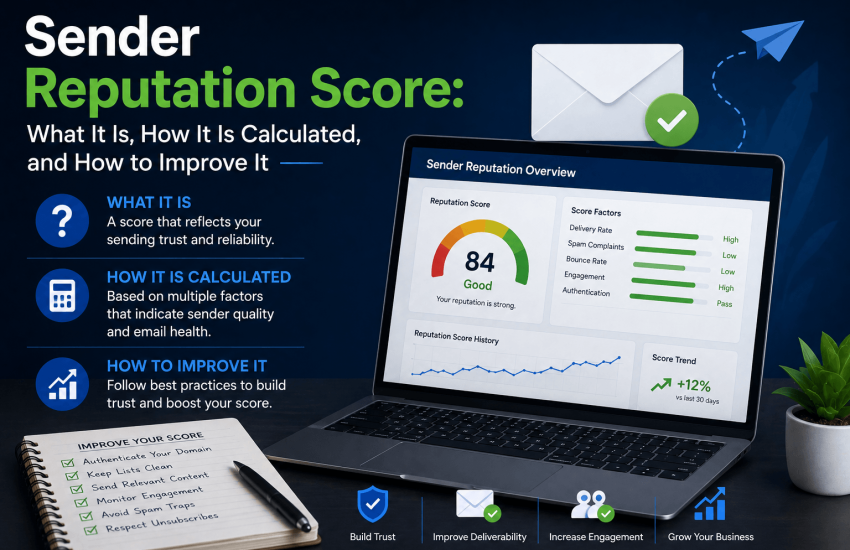
Every email you send arrives at a mailbox provider that has already formed a view of you as a sender. That view, your sender reputation, is a constantly updated assessment of your sending behavior, list quality, and recipients’ responses. It determines if your next email lands in the inbox, is routed to spam, or is rejected before delivery.
Sender reputation isn’t a single score or system. Each inbox provider and third-party database evaluates its own set of signals. Understanding domain and IP reputation, which signals matter most, and paths to recovery form the basis of an effective deliverability strategy.
To clarify this further: What is a Sender Reputation Score?
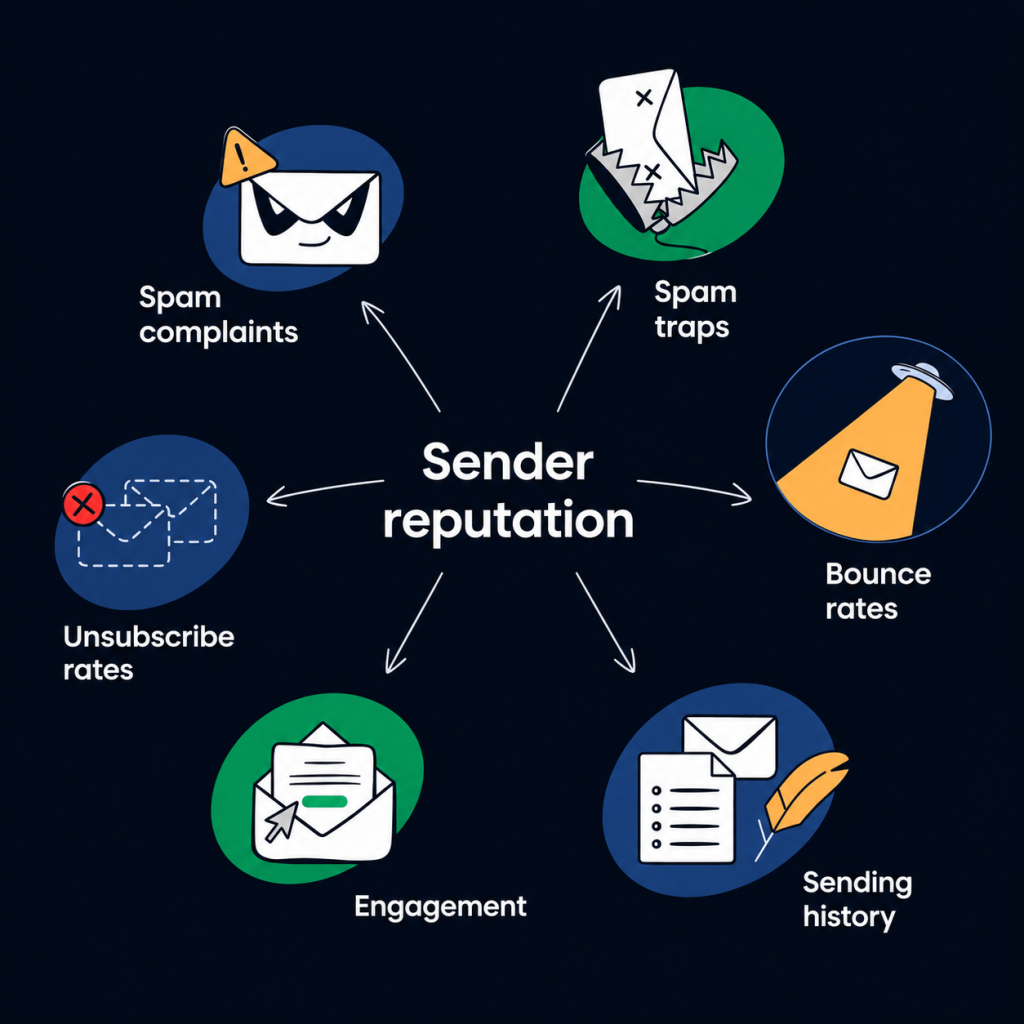
A sender reputation score is assigned to sending domains or IP addresses by mailbox providers and reputation databases based on past behaviors and engagement signals. It guides inbox providers on email placement: high scores mean the inbox, low ones mean spam or rejection.
There’s no universal sender reputation score. Gmail, Outlook, and Yahoo each calculate their own. Tools like Google Postmaster Tools, Microsoft SNDS, and Validity Sender Score can help, but don’t show the full picture across providers.
Domain Reputation vs IP Reputation: Two Separate Scores That Matter Differently
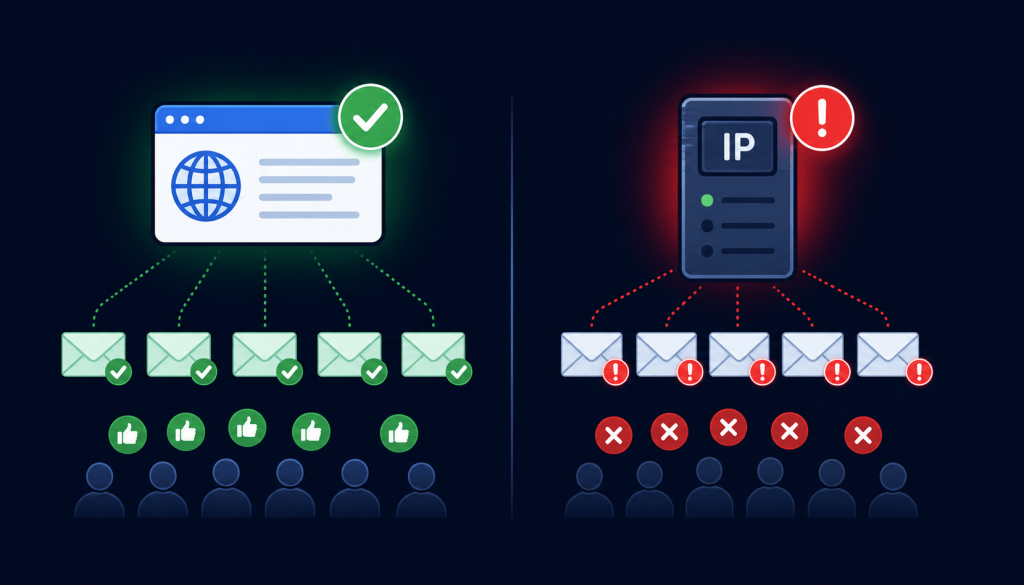
Most guides conflate domain reputation with IP reputation, but they are distinct concepts. Domain reputation refers to the trustworthiness of your sending domain, while IP reputation concerns the server’s IP address from which your emails originate. Each is measured differently, influenced by distinct factors, and requires its own recovery approach. Recognizing this distinction is essential for accurate diagnosis of deliverability.
| Dimension | Domain Reputation | IP Reputation |
| What is measured | The sending behavior and performance history associated with the domain in the From address of your emails (e.g., yourcompany.com) | The sending behavior and performance history associated with the specific IP address used to deliver the email |
| Who assigns it | Mailbox providers (Gmail, Outlook, Yahoo) calculate domain reputation internally based on emails sent from your domain. Third-party tools like Google Postmaster Tools report domain-level reputation. | Mailbox providers track IP reputation internally. Third-party tools, including Validity Sender Score and Microsoft SNDS, report IP-level reputation scores. |
| How long it takes to build | Domain reputation builds gradually over months of consistent, clean sending. A new sending domain has no reputation history and will experience higher friction initially. | IP reputation can be established faster for dedicated IPs through IP warming. Shared IPs inherit reputation from all senders using the same IP. |
| Is it shared with other senders? | No. Domain reputation is specific to your domain. It cannot be affected by other senders sharing your ESP’s infrastructure. | Depends. Shared IP addresses mean your IP reputation is influenced by the sending behavior of all senders on the same IP. Dedicated IPs give you full control. |
| What damages it most severely | Sustained high bounce rates, spam complaint rates above 0.1%, and spam trap hits associated with your sending domain | Sudden large volume increases, spam trap hits, and blacklisting of the specific IP address by major reputation databases |
| Can it be reset? | Partially. Domain reputation recovers gradually with sustained clean sending but a severely damaged domain reputation may never fully recover. Some senders choose to migrate to a new domain. | A blacklisted IP can be delisted with proof of remediation. Recovery is faster for IP reputation than for domain reputation in most cases. |
If you send through a shared ESP IP, your IP reputation depends partly on others. Your domain reputation is fully under your control, and a strong one offers greater resilience. Focus on list hygiene and authentication for long-term success, not just IP management.
How Mailbox Providers Calculate Sender Reputation
Mailbox providers don’t publish exact sender-reputation algorithms, but the common signals and their impacts are well documented. Below is a table listing key signals, their effect, and damage thresholds.
| Signal | Impact Weight | Healthy Threshold | How It Is Measured by Mailbox Providers |
|---|---|---|---|
| Spam complaint rate | Very High | Below 0.1% (Google). Below 0.3% is critical. | Users clicking the spam or junk button in Gmail, Outlook, or Yahoo. Google Postmaster Tools reports the complaint rate for recipients of Google messages. A single campaign with a score above 0.3% can trigger immediate deliverability action. |
| Hard bounce rate | Very High | Below 2% per campaign | The proportion of sent emails that receive a permanent 550-type SMTP rejection. Mailbox providers track bounce rates by sending to the domain. ESPs, including Mailchimp and Klaviyo, enforce their own bounce rate thresholds. |
| Spam trap hits | Critical (any volume) | Zero tolerance for pure spam traps | Spam trap addresses are monitored by blacklist operators and inbox providers. A single hit on a pure spam trap can trigger immediate blacklisting. Recycled trap hits accumulate reputation damage without immediate blacklisting. |
| Engagement rate | High | Open rates above 20% (varies by industry) | Mailbox providers infer the value of your email based on whether recipients open it, click, reply, or move it from spam to the inbox. Low engagement signals that recipients did not want to receive the content. |
| Sending volume consistency | Moderate to High | Gradual, consistent increases | Sudden large spikes in sending volume from a domain are treated as suspicious. New sending domains must warm up gradually by starting with small volumes and increasing incrementally over weeks. |
| Authentication (SPF, DKIM, DMARC) | High (baseline requirement) | All three must pass | Mailbox providers verify SPF alignment, DKIM signature validity, and DMARC policy compliance on every inbound email. Failing authentication signals either a misconfigured sender or a spoofed message. |
| Unsubscribe rate | Moderate | Below 0.5% per campaign | The proportion of recipients who click unsubscribe on a campaign. High unsubscribe rates signal that content is not relevant to the audience or that contacts did not genuinely opt in. |
| List age and recency | Moderate | No contacts older than 12 months without re-verification | Mailbox providers infer list quality from whether recipients have any prior engagement history with the sender. Sending to large volumes of contacts with no prior interaction is a negative signal. |
Spam complaint rate and hard bounce rate carry the most weight with Gmail and Outlook. Even one campaign with a complaint rate above 0.3% can trigger immediate filtering changes; sustained bounce rates above 5% compound negative effects. Both are primarily caused by poor list quality and can be addressed through list verification.
Third-Party Reputation Tools: What They Measure and How to Use Them
Third-party tools reveal sender reputation signals, helping with monitoring and diagnosis. Each tool measures different aspects and doesn’t reflect any one provider’s assessment.
| Tool | What It Measures | Who It Is For | Key Limitation |
|---|---|---|---|
| Google Postmaster Tools | Domain reputation and IP reputation specifically for email delivered to Gmail recipients. Reports spam rate, delivery errors, and authentication compliance. | Any sender using a verified sending domain. Free to set up. Requires domain ownership verification. | Only shows reputation with Gmail recipients. Does not reflect Outlook, Yahoo, or other providers’ reputation. |
| Microsoft SNDS (Smart Network Data Services) | IP reputation and complaint rates for email delivered to Outlook and Hotmail recipients. Shows spam trap hit rates and filter verdicts. | Senders with dedicated or known IPs sending to Outlook users. Free to set up with IP ownership verification. | Only covers Microsoft recipient domains. Does not reflect Gmail or Yahoo’s reputation. |
| Validity Sender Score | A 0 to 100 numeric score representing the sending reputation of an IP address based on Validity’s panel data. Higher scores indicate better reputation. | Email senders want a single numeric reputation indicator. Free basic score available at senderscore.org. | Reflects IP reputation only, not domain reputation. Based on panel data rather than direct mailbox provider measurement. Less directly connected to Gmail inbox placement than Google Postmaster Tools. |
| Barracuda Reputation System | Domain and IP reputation against Barracuda’s threat intelligence network. Used by organizations running Barracuda email security appliances. | Senders whose recipients use Barracuda email filtering. Relevant for B2B senders reaching corporate email environments. | Primarily reflects reputation with organizations using Barracuda products. Not a direct proxy for the reputation of major consumer inbox providers. |
Start with Google Postmaster Tools, since Gmail handles much global email. Set up domain verification and check scores weekly. Low domain reputation requires immediate action. Add Microsoft SNDS for Outlook volume. Use the Validity Sender Score as a broad indicator only.
What Damages a Sender’s Reputation the Most
Not all reputation damage is equally severe. Here is an ordered list of the most damaging behaviors, recovery times, and required actions.
| Damage Cause | Severity | Estimated Recovery Time | Recovery Actions Required |
|---|---|---|---|
| Single campaign with elevated bounce rate (2% to 5%) | Moderate | 2 to 4 weeks of clean sending | Immediately clean the contact list used in the campaign. Verify all addresses in the segment. Resume sending with a verified list and keep bounce rate below 2%. |
| Sustained high bounce rate (above 5%) over multiple campaigns | High | 4 to 8 weeks of clean sending | Pause all sending. Perform a full database verification. Suppress all invalid, disposable, and spam trap contacts. Rebuild sending volume gradually, starting with the highest-engagement segments. |
| Spam complaint rate above 0.3% on a campaign | High | 3 to 6 weeks with corrective action | Audit the sending list for unconfirmed opt-ins and unengaged contacts. Implement double opt-in for new subscribers. Apply re-engagement suppression before the next send. Review campaign content for misleading subject lines. |
| Single pure spam trap hit | Very High | 4 to 12 weeks, may not fully recover | Identify the source of the trap address. Verify the entire list that contained it. Investigate data sourcing practices that allowed a pure trap to enter the database. Consider IP or subdomain isolation for recovery sending. |
| Domain blacklisted by Spamhaus or SURBL | Critical | Weeks to months after delisting | Submit a delisting request to the blacklist operator with evidence of remediation. Verify and clean the full contact database. Demonstrate sustained clean sending behavior over multiple weeks before delisting is confirmed. |
| New sending domain with no reputation history | Not damage; no reputation yet | 4 to 8 weeks of IP warming | Begin with very small sending volumes (hundreds per day) and increase gradually over 4 to 8 weeks. Send to highest-engagement contacts first. Maintain near-zero bounce rates during the warming period. |
The root cause of severe sender reputation damage is usually poor list quality, sending to addresses that aren’t associated with the sender. Spam traps, invalid addresses, and unconfirmed opt-ins contribute to high damage signals. Verifying your list is essential, not optional, for sender reputation management.
How Email Verification Directly Improves Sender Reputation
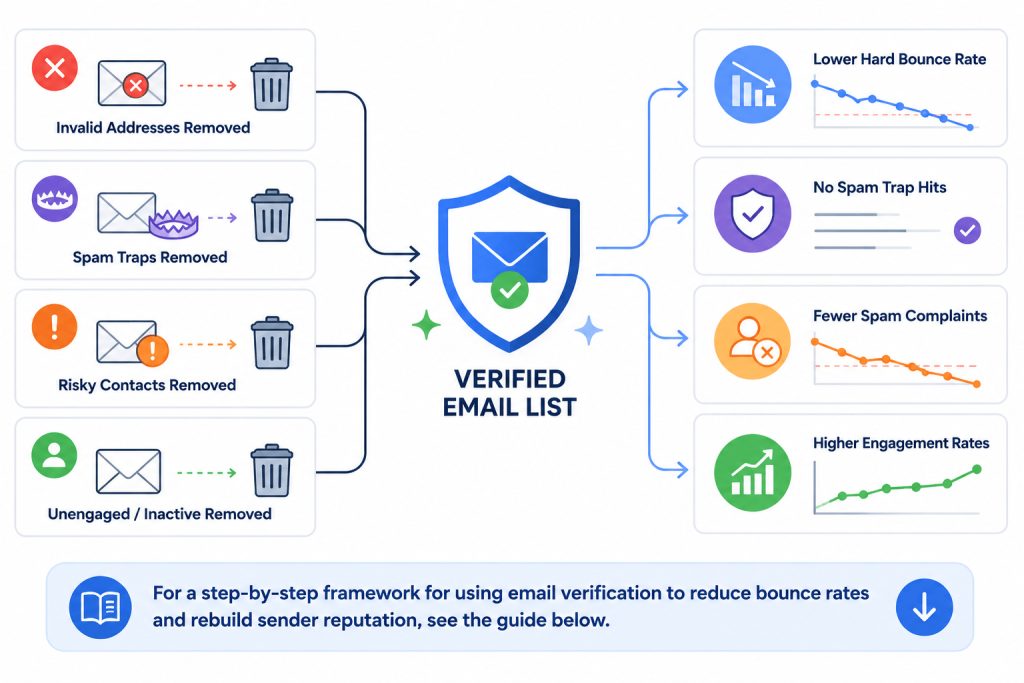
Each email address removed before a campaign is a potential issue avoided: a bounce, spam trap, or complaint that won’t occur. Verification has quantifiable reputation benefits.
Reducing Hard Bounce Rate
Hard bounces strongly impact reputation. Removing 3% invalid contacts from 100,000 emails avoids 3,000 bounces and keeps your bounce rate below warning levels. Only confirmed addresses remain after verification, lowering bounce rates.
Eliminating Spam Trap Exposure
Spam-trap addresses appear valid, but can only be identified with dedicated detection. MyEmailVerifier checks all addresses against updated trap databases, removing traps before sending and avoiding damaging hits or blacklisting.
Reducing Spam Complaint Risk
Spam complaints come from real recipients who didn’t want your emails, often due to poor opt-in practices. Verification doesn’t confirm consent, but removing bad contacts reduces the risk of unsolicited sends.
Improving Engagement Rate Signals
A cleaned list leads to higher open, click, and reply rates because only valid, engaged contacts remain. Higher engagement rates signal to inbox providers that inbox placement should be favored in future campaigns.
For a step-by-step framework for using email verification to reduce bounce rates and rebuild sender reputation, see the guide below.

How to Check and Monitor Your Sender Reputation
To monitor sender reputation, set up tools to track your domain and IP address data. Follow these essential steps:
- Set up Google Postmaster Tools. Go to postmaster.google.com, add your sending domain, and verify ownership by adding a TXT record to your DNS. Once verified, Google Postmaster Tools provides daily updates on domain reputation, IP reputation, spam rate, authentication compliance, and delivery errors for email sent to Gmail recipients.
- Register your IP with Microsoft SNDS. If you use a dedicated sending IP or know the shared IPs used by your ESP, register them at the Microsoft SNDS portal (sendingnetwork.microsoft.com). SNDS reports complaint rates and spam-trap hit rates for emails sent to recipients of Outlook and Hotmail.
- Check your Sender Score. Enter your sending IP at senderscore.org (Validity) to see the current numeric reputation score. This is a quick directional check rather than a primary diagnostic tool.
- Check blacklist status. Use a multi-blacklist checker tool to see whether your sending IP or domain appears on any major blacklists, including Spamhaus, SURBL, or Barracuda. This should be part of your pre-campaign checklist for any large send.
- Review ESP bounce and complaint reports. Your ESP provides campaign-level bounce-rate and spam-complaint-rate data. Review these after every send and track trends over time. A gradual upward trend in bounce rate or complaint rate is an early signal of deteriorating list quality.
For a comprehensive pre-campaign deliverability checklist, including authentication, blacklist status, and list verification, see the guide on what is an email blacklist.
Authentication: The Non-Negotiable Foundation of Sender Reputation
Authentication does not directly improve engagement signals or remove bad addresses, but it is a prerequisite for any sender reputation to function correctly. Without proper authentication, your emails may fail to be attributed to your domain’s reputation at all, or may be actively penalized by inbox providers that require authentication as a baseline.
- SPF (Sender Policy Framework): A DNS TXT record that lists the IP addresses authorized to send email on behalf of your domain. Inbox providers check SPF records to confirm that an email originated from an authorized source. SPF failures are treated as a suspicious signal.
- DKIM (DomainKeys Identified Mail): A cryptographic signature added to outgoing emails that confirms the message has not been altered in transit and originates from the signing domain. DKIM passes are a positive reputation signal and are required for DMARC enforcement.
- DMARC (Domain-based Message Authentication, Reporting and Conformance): A policy record that tells inbox providers what to do with mail that fails SPF or DKIM checks (none, quarantine, or reject) and sends reporting data back to the domain owner. DMARC is required by Google and Yahoo for bulk senders sending more than 5,000 emails per day.
All three are required for reliable inbox placement in 2026. Missing any one of them is a baseline deliverability risk that compounds every other reputation challenge.
Frequently Asked Questions
What is an email sender’s reputation score?
An email sender reputation score is an assessment made by mailbox providers and third-party reputation databases of a sending domain, a sending IP, or both, based on historical sending behavior and recipient engagement signals. It determines how incoming email from that sender is treated: delivered to the inbox, routed to spam, or rejected at the server level. Each inbox provider calculates its own internal reputation score independently. Third-party tools such as Google Postmaster Tools, Microsoft SNDS, and Validity Sender Score provide external visibility into specific dimensions of that reputation.
How do mailbox providers calculate sender reputation?
Mailbox providers do not publish their exact algorithms, but the primary signals are well-established. The highest-weight negative signals are the spam complaint rate (users marking emails as spam), the hard bounce rate (permanent delivery failures), and spam trap hits. Positive signals include consistent engagement (opens, clicks, replies), stable sending volumes, successful email authentication (SPF, DKIM, DMARC), and low unsubscribe rates. Domain reputation and IP reputation are assessed separately, and both contribute to the overall filtering decision for each inbound email.
What factors hurt the email sender’s reputation the most?
The three most damaging factors are spam trap hits, spam complaint rates above 0.1%, and sustained hard bounce rates above 2%. Spam trap hits are the most severe because a single hit on a pure spam trap can trigger immediate blacklisting. Complaint rates above 0.3% on a single campaign can produce same-day changes in Gmail filtering behavior. Sustained bounce rates above 5% produce progressive deliverability degradation that compounds with each subsequent send. All three are directly addressable through email list verification and hygiene practices.
How long does it take to rebuild a damaged sender reputation?
Recovery time depends on the severity and source of the damage. Moderate bounce-rate issues with a clean list can be resolved within 2 to 4 weeks of clean sending. Sustained high bounce rates or spam complaint problems require 4 to 8 weeks of corrective action and verified clean sending before reputation metrics normalize. Domain blacklisting through spam trap hits can take weeks to months, requiring a formal delisting request to the blacklist operator plus demonstrated remediation. Reputation recovery is always slower than reputation damage, which is why prevention through list hygiene is substantially more effective than remediation.
How does email verification improve sender reputation?
Email verification improves sender reputation by removing the addresses that cause the most damaging signals before any send. Invalid addresses generate hard bounces. Spam trap addresses trigger blacklisting and reputation damage without any visible signal. Disposable addresses contribute to dilution of engagement rates and increased bounce risk in the future. Removing all three categories before sending keeps bounce rates below 2%, eliminates trap-hits, and ensures engagement metrics are calculated against a list of genuinely deliverable contacts. The cumulative effect across multiple verified campaigns is a stable or improving domain reputation score.
Reputation Is a Reflection of List Quality
The path to a strong sender reputation runs directly through the quality of the contact list being sent to. Spam complaints, hard bounces, and spam trap hits are the three signals that damage reputation most severely, and all three originate in the same root cause: sending to addresses that should not be on the list.
Email verification is the intervention that addresses this at the source. A fully verified list before every campaign eliminates invalid addresses, reduces spam-trap exposure, and reduces the proportion of unengaged contacts that dilute engagement rate signals. The result is not just better deliverability metrics; it is a reputation trajectory that compounds positively with every campaign sent from a clean, verified list.


James P. is Digital Marketing Executive at MyEmailVerifier. He is an expert in Content Writing, Inbound marketing, and lead generation. James’s passion for learning about people led her to a career in marketing and social media, with an emphasis on his content creation.