 Posted by
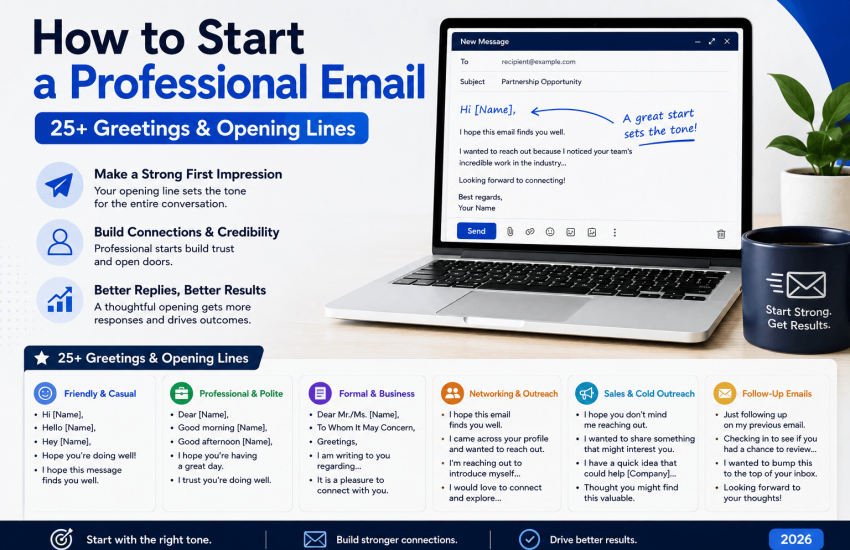
The first 15 seconds of a professional email are crucial. Boomerang research on 350,000 emails found that personalized greetings boost response rates by 53 percent, and a 2026 Instantly benchmark showed that informal but personalized openers earn nearly 80 percent higher positive replies than generic greetings. Your opener is your highest-impact sentence all week.
This guide walks you through the essentials for starting a professional email in 2026: which salutations to use in various situations, 25+ scenario-based opening lines to adapt, what to avoid, and a frequently missed detail that determines whether your opener gets seen at all. Let’s look at the foundational structure next.
How to Start a Professional Email (Quick Answer)
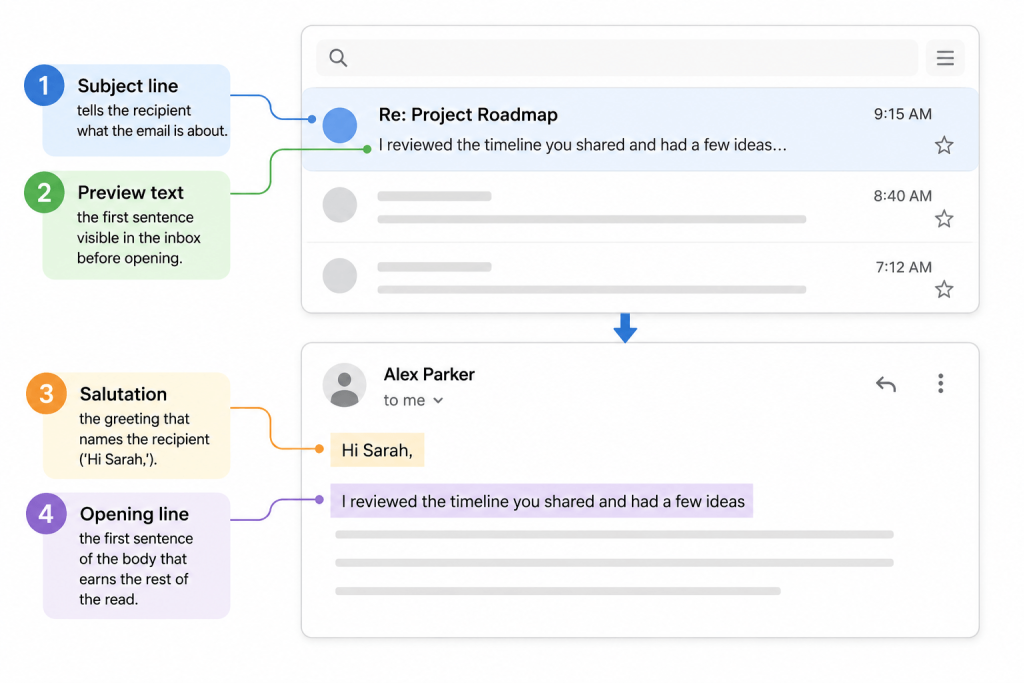
A professional email opens in four layers, not one:
- Subject line: tells the recipient what the email is about.
- Preview text: the first sentence visible in the inbox before opening.
- Salutation: the greeting that names the recipient (‘Hi Sarah,’).
- Opening line: the first sentence of the body that earns the rest of the read.
Most people focus only on salutations. Top communicators design all four layers. If you get one wrong, your message might not be opened, read, or may come off with the wrong tone.
In Short
A professional email begins with a clear subject line, useful preview text, a relationship-appropriate salutation, and a first sentence that immediately states why you are writing. No, I hope this email finds you well.’ No long preambles. State your purpose by sentence two at the latest.
The 3-Axis Decision Framework: How to Choose Your Greeting
Before you pick a greeting, run a 5-second check on three axes. These three factors determine the appropriate level of formality every time.
|
Axis |
Question to Ask | Pulls You Toward |
| Relationship | Have I emailed this person before, and how well do I know them? |
First contact → formal. Ongoing thread → casual. |
|
Context |
What is the industry, seniority, and cultural setting? | Law, finance, government, academia → formal. Tech, startups, creative, internal team → casual. |
| Purpose | What is this email actually doing? |
Job application, complaint, bad news, executive ask → formal. Quick update, internal sync, casual question → casual. |
If the three axes conflict, use a slightly more formal tone. You can warm up in later emails. You can’t un-send a ‘Hey buddy’ to a CFO.
10 Professional Email Greetings That Work in 2026
These salutations work across modern work settings. Each comes with a clear rule for when to use it; no guessing.
|
Greeting |
Best For | Tone |
| Dear [Mr./Ms. Last Name], | Cover letters, legal, finance, government, first contact with senior executives |
Formal |
|
Dear [Full Name], |
Job applications when you have the recruiter’s name but not their pronouns or honorific | Formal, gender-neutral |
| Dear [First Name], | Formal communication with someone who has signed off with their first name |
Formal but warmer |
|
Hello [First Name], |
Most first-touch professional emails in 2026; safest middle-ground choice | Semi-formal |
| Hi [First Name], | Modern default for ongoing professional emails, internal colleagues, modern clients |
Semi-formal, modern |
|
Good morning / afternoon [Name], |
Polite, time-aware opener when you want warmth without losing professionalism | Semi-formal |
| Hi team, / Hi all, | Internal group emails, project updates, multi-recipient threads |
Casual professional |
|
Greetings, |
Conservative, neutral fallback when name is unknown and group is small | Neutral |
| Dear Hiring Manager, | Job applications where the recruiter’s name is not findable after honest effort |
Formal, role-based |
|
Dear [Department] Team, |
Cold outreach to a specific department (Sales, Marketing, Procurement) when no name is available |
Formal, role-based |
Pro Tip From the MyEmailVerifier Team
Always use a comma after greetings. ‘Hi Sarah!’ can seem over-eager or unprofessional. ‘Hi Sarah,’ is standard. The exception: if the recipient often uses exclamation marks, match their tone.
Salutations to Stop Using in 2026
These openers feel outdated or alienating and reduce responses. Avoid them in professional emails today.
|
Avoid |
Why It Fails | Use Instead |
| To Whom It May Concern, | Signals you did not bother to research the recipient. HubSpot data shows 45 percent lower open rates. |
Dear Hiring Manager, or Dear [Department] Team, |
|
Dear Sir/Madam, |
Outdated. Makes binary gender assumptions and reads as form-letter language in 2026. |
Dear [Full Name], or Dear [Job Title], |
|
Hey [Name], |
Too casual for cold outreach, executive emails, or formal industries. Tanks reply rates with senior contacts. |
Hi [Name], or Hello [Name], |
|
Hi [First Name], |
Yes, literally that. Sending a personalization placeholder unchanged is the cardinal sin of bulk outreach. | Always verify your merge tags rendered before sending. |
| Misspelled name | Worse than no name at all. Signals you did not care enough to copy-paste correctly. |
Triple-check the spelling against their LinkedIn or signature. |
|
No greeting at all |
Reads as cold, abrupt, or curt. Acceptable only in short replies inside an active thread. | Always include a greeting on first contact. |
| Yo / Sup / What’s up, | Casual slang has no place in any external professional email. |
Hi [Name], even for friendly internal threads. |
25+ Professional Email Opening Lines by Scenario
The salutation is just the entry. The opening line gets them to read on. Here are 25+ opening lines for common scenarios, along with their best uses.
Cold Outreach
- I recently saw your post on [topic], and your point about [specific detail] is a challenge we help companies in [industry] solve.
- Congratulations on the recent [company news, funding round, expansion]. At this stage, many teams encounter [specific challenge], and we help address it.
- With [Company]’s recent entry into [new segment], I am interested in how you’re handling [specific bottleneck].
- I know this is a cold email. I noticed [specific, researched observation] and wanted to highlight how this could be relevant for you.
Note: lemlist found that value-first openers (offering insight or a free resource) outperform all others. The generic ‘I hope this email finds you well’ does the worst.
Job Application
- “I’m writing to apply for the [Role] position posted on [source].”
- “Please find my application for the [Role] position attached for your review.”
- “[Mutual contact name] suggested I reach out about the [Role] opening on your team.”
Follow-Up Email
- “Following up on my note from last week. Wanted to make sure it didn’t get lost in your inbox.”
- “Circling back on the proposal I sent on [date]. Happy to answer any questions.”
- “Since I last wrote, [new relevant development]. Thought it was worth flagging.”
- “Quick nudge in case this slipped past. No rush, just wanted to keep it on your radar.”
For more on follow-up timing and structure, see our full follow-up guide.
Client or Customer Email
- “Hope your week is going well. Wanted to share a quick update on [project].”
- “Thanks again for the call on [day]. As promised, here is [deliverable].”
- “Before your next [milestone], I wanted to walk through [specific point] so we’re aligned.”
Internal Team Email
- “Heads up before the standup. [quick context].”
- “Sharing the [report, doc, deck] we discussed yesterday. Highlights in the first paragraph.”
- “Need your input on [specific decision] by [deadline]. Three options below.”
Reply to an Inbound Inquiry
- “Thanks for reaching out. To answer your question directly: [answer].”
- “Appreciate you getting in touch. Here is what I can confirm at this stage: [info].”
Introduction Email
- “[Person A], meet [Person B]. [Person B], [Person A] runs [role at company] and has been doing exactly what you mentioned wanting to explore.”
- “By way of introduction, I’m [Name], [role at company], and I work on [relevant area]. [Mutual contact] thought we should connect.”
Bad News, Complaint, or Difficult Subject
- “I wanted to flag something before it becomes an issue: [problem].”
- “There is a delay on [item] that I need to bring to your attention. Here is what happened, and here is what we are doing about it.”
- “This email is harder to write than most, but I owe you a direct answer on [topic]: [answer].”
7 Common Mistakes That Sabotage Your Email Opener
- Defaulting to ‘I hope this email finds you well.’ It’s overused and gets skimmed. If you use a pleasantry, make it specific: ‘Hope your launch Tuesday went smoothly’ is far better.
- Long preambles lose. Introduce your purpose in sentence two or earlier.
- Wasting preview text. The first 90–120 characters show in inboxes. ‘Dear Sarah, I hope this email finds you well’ wastes this prime space.
- Mismatched formality. ‘Hey John,’ to a senior partner at a law firm signals carelessness. ‘Dear Mr. Patel’ to a startup founder you’ve Slacked with twice reads as stiff.
- Misspelling the recipient’s name is the most common reason application emails get ignored in studies.
- Starting with yourself wastes space. Your signature already says who you are. Begin with the recipient.
- Sending from an unverified address means even the best opener fails if your message bounces or lands in spam.
The Layer Nobody Talks About: Preview Text
Most guides stop at the salutation. They miss the most visible part: preview text; the snippet beside the subject in inboxes.
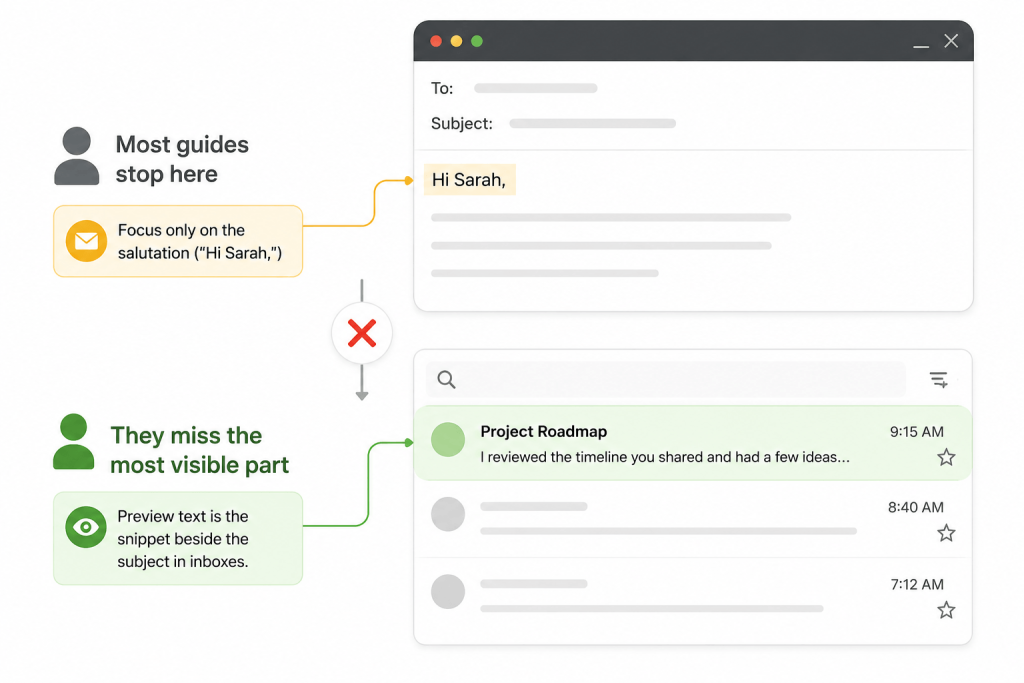
Studies say 34 percent weigh preview text nearly as much as subject lines. On mobile, preview text often takes more space than the subject line.
How to Optimize Preview Text
- Make the first sentence of your email body do double duty. It is your preview text, whether you like it or not.
- Avoid burning preview text on greetings. ‘Dear Sarah, I hope this email finds you well’ shows up in the inbox as exactly that, and tells the reader nothing about the email.
- Front-load the value. If your first sentence states the benefit or the question, the recipient sees it before they decide to open.
- Keep the first 90 characters specific. Mobile clients typically truncate around there.
Example of bad preview text: ‘Dear Sarah, I hope this message finds you well during this busy season.’
Example of good preview text: ‘Saw your post on retention. One tactic worked for 3 of our SaaS clients and might be worth 2 minutes.’
Modern Considerations: Mobile, AI Templates, and Cultural Norms
Mobile-First Reality
On mobile, subject lines show ~30–35 characters, preview text ~90 characters; the salutation is first when opened. Preview on your phone before sending.
The AI Template Trap
AI email writers use common patterns. Phrases like ‘I hope this email finds you well’ increased in 2025–2026 because LLMs suggest them. If your opener seems AI-generated, it probably is, and recipients notice. Specific openers always outperform AI defaults.
Cross-Cultural Notes
Email norms differ; ‘Hi, Akiko’ to a Japanese executive may seem careless. ‘Dear Mr. Larsson’ to a Swedish founder can seem distant. Cold email research finds Europeans reply 2–3 times more often than US recipients. When emailing internationally, be slightly more formal than you would domestically.
The Best Opener Is Useless If the Email Never Arrives
This is the part most professional email guides ignore. You can write a perfect subject line, perfect preview text, perfect salutation, and a perfect opening sentence, and none of it matters if any of these happen:
- The email address is invalid, and the message hard-bounces.
- The address is a spam trap that damages your sender’s reputation.
- Your bounce rate is high enough that your domain gets flagged, sending future emails to the spam folder.
- The address belongs to a role inbox (info@, sales@) that goes unread.
Across thousands of campaigns we have observed at MyEmailVerifier, lists with bounce rates above 5 percent see open rates collapse, not because the openers are weak, but because the messages never reach the primary inbox in the first place. Sender reputation is fragile. A few hundred invalid addresses can be enough to get the slide started.
Quick Check Before Your Next Send
If you are sending to a list larger than a few hundred addresses, run it through a bulk email verifier first. It will flag invalid, role-based, disposable, and risky addresses before they damage your sender reputation. The cost of verifying a list is a fraction of the cost of getting your domain throttled. See also our guide on how to reduce email bounce rate and how to prevent emails from going to spam.
Putting It All Together: A Complete Example
Here is what a complete, well-started professional email looks like, with each of the four layers labeled.
|
Subject line |
Quick idea for Acme’s onboarding flow |
| Preview text (first body sentence) |
Noticed Acme’s new signup page loads three forms before the user reaches the dashboard, and one change cut the dropoff by 24 percent for two of our clients. |
|
Salutation |
Hi Priya, |
| Opening line |
Noticed Acme’s new signup page loads three forms before the user reaches the dashboard, and one change cut the dropoff by 24 percent for two of our clients. Worth a 15-minute call this week? |
Four layers. Each one earns the next. No wasted real estate.
Frequently Asked Questions
What is the best way to start a professional email?
The best way is a relationship-appropriate salutation (‘Hi [First Name],’ for most modern professional contexts, ‘Dear [Mr./Ms. Last Name],’ for formal first contact) followed by an opening line that states your purpose within one sentence. Skip ‘I hope this email finds you well.’
How do you begin a professional email if you do not know the recipient’s name?
Use a role-based greeting like ‘Dear Hiring Manager,’ or ‘Dear Marketing Team,’ rather than ‘To Whom It May Concern’ or ‘Dear Sir/Madam.’ Both of the latter signal that you did not research the recipient. Always spend two minutes on LinkedIn first to try to find a name.
Is ‘Hi’ professional in an email?
Yes, ‘Hi [First Name],’ is the modern professional default in 2026 for ongoing correspondence, internal emails, and most modern industries. For first contact in conservative fields (law, finance, government, academia), ‘Hello [First Name],’ or ‘Dear [Mr./Ms. Last Name],’ is safer.
Should I use ‘Dear’ in a professional email?
Use ‘Dear’ for formal first-contact emails, job applications, cover letters, and communication with senior executives or in conservative industries. For ongoing internal or peer communication, ‘Dear’ often reads as overly stiff.
What is a good opening line for a professional email?
A good opening line states your purpose, references something specific to the recipient, or delivers immediate value. Examples: ‘I am writing to apply for the [Role] position,’ ‘Saw your post on [topic] and had one quick thought,’ or ‘Following up on my note from Tuesday.’ Avoid generic pleasantries.
How do you start an email without ‘I hope this email finds you well’?
Replace it with something specific or skip the pleasantry entirely. Options: ‘Hope your week is going well,’ (specific time reference), ‘Quick question:’ (direct), ‘Following up on [thing]:’ (referential), or simply state your purpose. Specificity always outperforms generic well-wishes.
Does the email greeting affect open rates?
The salutation itself does not affect open rates because the recipient does not see it until after opening. However, the preview text (usually the first sentence after the greeting) significantly affects open rates. Optimize the first body sentence, not just the greeting.
How long should the opening of a professional email be?
Salutation: one line. Opening sentence: one to two sentences. By the third sentence, you should be deep into the actual purpose of the email. The 2026 Instantly benchmark found that cold emails under 80 words perform best, leaving very little room for preamble.
The Bottom Line
Starting a professional email well is not about memorizing a list of greetings. It is about designing four layers (subject, preview text, salutation, opening line) so that each one earns the next. Match formality to the relationship, the context, and the purpose. Skip the pleasantries that everyone has stopped reading. Make the first body sentence do real work.
And remember the part most guides forget: none of this matters if the email never lands in the primary inbox.
Verify Email Address Before You Send
A polished opener cannot save a bounced email. If you are running outreach, newsletters, or transactional campaigns at any scale, verify your list with MyEmailVerifier before your next send. We flag invalid, disposable, role-based, and spam-trap addresses so your sender reputation stays clean and your carefully crafted openers actually get read.
Start a free email verification →
Related Reading
- The complete guide to writing a professional email
- How to end an email professionally
- Modern email etiquette rules
- Best email signature examples
- How to write a follow-up email
- How to reduce your email bounce rate

James P. is Digital Marketing Executive at MyEmailVerifier. He is an expert in Content Writing, Inbound marketing, and lead generation. James’s passion for learning about people led her to a career in marketing and social media, with an emphasis on his content creation.