 Posted by
Most people assume that if an email address looks right, with the @ symbol and a real domain, it’s valid. They send the email or add it to a list, but then receive a bounce.
Looking valid and being valid differ. An address can appear correct and match a real domain, yet still be undeliverable because the specific mailbox no longer exists. Truly confirming validity requires more than just a visual check.
This guide explains what email validity actually means at each level, how to check any address for free in under a minute, and how to interpret the results so you know exactly what to do with the address.
Quick Answer: How Do You Check If an Email Address Is Valid?
The fastest and most reliable way to verify an email address is to use a dedicated email verification tool that performs a live SMTP-level mailbox check. This type of check connects to the recipient’s mail server to confirm whether the mailbox exists and is accepting email, without sending anything to the address.
MyEmailVerifier provides a free single-address checker that performs this check in seconds. Every registered account receives 100 free verification credits daily with no credit card required. The result tells you whether the address is valid, invalid, catch-all, disposable, a spam trap, greylisted, or role-based, and what each status means for your situation.
If you only need to check one address right now, that is the fastest route. The rest of this guide explains the result you will receive and the important distinction most people miss: why a valid-looking address is not always deliverable.
Before diving into the email verification methods, it’s crucial to define what we mean by a valid email address. Understanding validity at each level helps ensure your checks are comprehensive and meaningful.
The word “valid” is used loosely when referring to email addresses. In practice, validity exists at three distinct levels. An address can pass the first two levels and still fail the third, and only the third level tells you whether the address will actually deliver.
|
Level |
Validity Type | What It Confirms | Example of a Passing Address | Can a Passing Address Still Bounce? |
|---|---|---|---|---|
| 1 | Format validity | The address is structured correctly: a local part before @, a domain name, and a valid top-level domain. No illegal characters are present. | [email protected] passes. [email protected] fails. user @company.com fails. |
Yes. An address can be perfectly formatted and still belong to a mailbox that does not exist or was deactivated. |
|
2 |
Domain validity | The domain in the address exists and has at least one active mail server configured to receive email (confirmed via MX record lookup). | [email protected] passes because gmail.com has active MX records. [email protected] would fail. | Yes. The domain can be real and the mail server active while the specific mailbox does not exist at that domain. |
| 3 | Mailbox validity | The specific mailbox exists at the mail server and is currently accepting incoming email. Confirmed through live SMTP handshake with the recipient server. | [email protected] passes only if that exact mailbox is live and accepting mail at the time of the check. |
Rarely, and only in specific cases: catch-all domains that accept all addresses, or Yahoo and AOL accounts that have been disabled but still return a passing response. |
The takeaway: Checking whether an email address is valid without performing a mailbox-level check (verifying that a specific inbox exists and can receive email) is like confirming a phone number has the right number of digits without checking whether anyone answers. Format and domain checks, which verify proper structure and the existence of email servers, are necessary but not sufficient. Only a Level 3 SMTP mailbox check (using the Simple Mail Transfer Protocol to connect to the mail server for real-time verification), ideally with added checks for catch-all domains (domains that accept mail for any address) and provider-specific issues, gives you a result you can act on with confidence.
Why a Valid-Looking Email Address Is Often Not Deliverable
This is the gap that surprises many senders. The address came from a real person, on a real domain, and looks legitimate; yet it bounces.
There are six specific scenarios where an email address passes basic validity checks but is not deliverable. Each one is invisible without a mailbox-level check.
| Address Type | Why It Looks Valid | Why It Is Not Deliverable | Detectable Without SMTP Check? |
|---|---|---|---|
|
Deactivated business email |
Correct format. Domain exists. The company mail server is active. | The specific mailbox was deactivated when the employee left the company. The mail server rejects delivery with a 550 response. | No. Only an SMTP-level check can detect this. Format and domain checks both pass. |
| Abandoned personal account | Correct format. Gmail, Yahoo, or Outlook domain is real and active. | The account has been dormant for an extended period. Depending on the provider’s policy, the account may have been deactivated or recycled. |
No. The inbox provider’s domain passes all checks. Only a live SMTP handshake reveals the account status. |
|
Yahoo or AOL disabled account |
Correct format. Yahoo and AOL are real, active domains with functioning mail servers. | Yahoo and AOL return a 250 acceptance response for disabled and suspended accounts rather than a 550 failure. A standard check marks them as valid when they are not. | No, with standard tools. MyEmailVerifier’s disabled user detection identifies these accounts through proprietary response pattern analysis. |
| Disposable email address | Correct format. The disposable service runs a functioning mail server that passes all basic checks. | Disposable addresses are intentionally temporary. They are abandoned immediately after use and generate bounces or are recycled into spam traps. |
Only with a dedicated disposable detection database. Format and SMTP checks alone do not flag these addresses. |
|
Catch-all domain address |
Correct format. Domain is real. Mail server returns a 250 acceptance for the address. | The server accepts all addresses at the domain regardless of whether the specific mailbox exists. The 250 response does not confirm the mailbox is real. | No, through SMTP alone. Catch-all domain detection flags the domain and confidence scoring assesses the likelihood the specific address is real. |
| Typo domain address | Looks correct at a glance. [email protected] or [email protected] appear to be minor variations of common domains. | The address was entered incorrectly. If the misspelled domain is not operated as a typo trap, the domain has no MX records and delivery fails. If it is a typo trap, sending to it damages sender reputation. |
Yes, through MX record lookup. If the misspelled domain has no MX records, it fails a domain validity check. If it is a typo trap domain, trap detection flags it. |
In all six scenarios, surface-level validity does not ensure deliverability. A format check confirms correct typing, and a domain check confirms an active mail server, but only a live SMTP check fills the gap.
How to Check If an Email Address Is Valid Right Now: Step by Step
The following steps use MyEmailVerifier’s free email checker tool. This tool performs full multi-layer validation and returns a result in under 10 seconds.
Step 1: Register for a Free Account
Go to MyEmailVerifier and create a free account. No credit card is required at any point. Every account receives 100 free verification credits each day, which reset at midnight. These credits match paid credits in quality and include full multi-layer checking: SMTP verification, spam trap detection, greylist detection, disposable email identification, and detection of Yahoo and AOL disabled users.
Step 2: Open the Single Email Verification Tool
Navigate to the single email verification section of your dashboard. This is the tool designed for checking one address at a time. You will see a single input field where you enter the address you want to check.
Step 3: Enter the Address and Submit
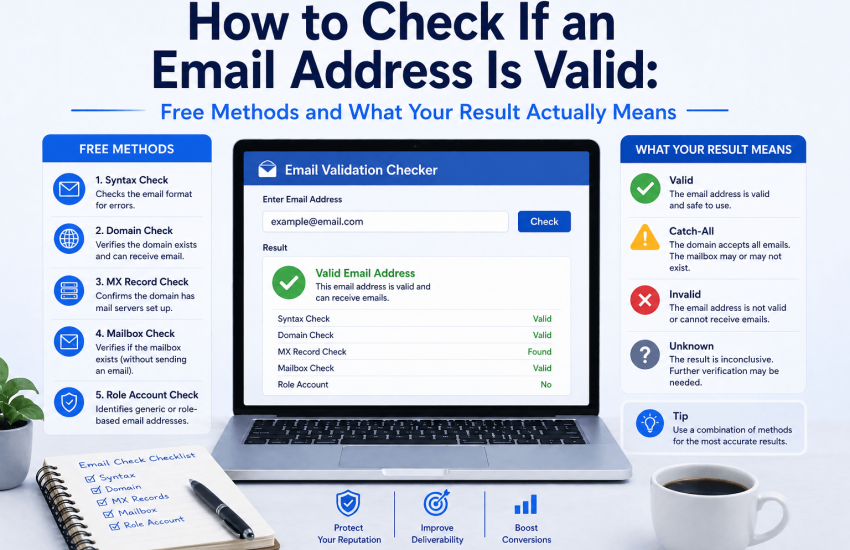
Type or paste the email address into the input field and click verify. The tool initiates the following checks in sequence, all of which complete before the result is returned to you:
- Syntax check: Confirms the address is correctly formatted with no illegal characters, a valid local part (the section before the @ symbol), an @ symbol, a domain (the part after @), and a top-level domain (such as .com or .org).
- MX record lookup: Queries the DNS records (Domain Name System information that controls website and email routing) of the domain to confirm that at least one mail server is configured to receive email for that domain.
- SMTP handshake: Connects to the recipient’s mail server to verify that the mailbox exists and is accepting mail, without delivering any message.
- Spam trap database cross-reference: Checks the address against continuously updated spam-trap databases (email addresses set up to catch senders who use poor email practices).
- Disposable email detection: Checks whether the address was created through a known temporary or throwaway email service, which people use for short-term needs and abandon quickly.
- Greylist detection: Identifies whether a temporary deferral response from the mail server is due to greylisting (a technique where a mail server temporarily rejects an email from a new sender to verify its legitimacy), rather than a genuine failure.
- Yahoo and AOL disabled user detection: Checks for specific response patterns from Yahoo and AOL indicating a user’s account has been disabled due to inactivity, which can cause misleading results in standard checks.
Step 4: Read Your Result
The result appears within seconds. You will see a clear status label alongside a plain-language explanation of its meaning. The next section of this guide covers every possible result and the exact action to take for each one.

What Your Email Validity Check Result Means
The result of your check will be one of seven possible statuses. The table below explains each one in plain terms, what it means for your specific situation, and the action you should take.
|
Result |
In Plain Terms | What It Means for You | Action to Take |
|---|---|---|---|
| Valid | The address is real, and the mailbox is active. | Safe to send. The address passed format, domain, and mailbox-level checks. Delivery is expected to succeed. |
Include in your list or outreach sequence. No further action required. |
|
Invalid |
The address does not exist, or the mailbox cannot receive mail. | Sending will produce a hard bounce. This is the most damaging outcome for sender’s reputation. | Remove immediately from every list, segment, and sequence. Never retry. |
| Catch-All | The domain accepts all addresses but the specific mailbox may or may not exist. | The result is inconclusive at the mailbox level. Some catch-all addresses are real contacts. Others are not. |
Segment separately. For warm or inbound contacts, include with awareness. For cold outreach, apply a confidence threshold and suppress low-confidence catch-all addresses. |
|
Disposable |
The address was created with a throwaway email service. | Not a genuine contact. The address will be abandoned or deactivated shortly. Sending generates bounces or spam complaints. | Remove immediately. Disposable addresses carry no deliverability or engagement value. |
| Spam Trap | The address is monitored by an anti-spam operator to identify poor list hygiene. | Sending to this address damages your sender’s reputation and can trigger blacklisting. The harm is invisible; no bounce is returned. |
Remove immediately without exception. This is the most critical removal on any list. |
|
Greylisted |
The domain uses temporary deferrals as a spam prevention technique. | The address is likely valid. The first email may take a few extra minutes to arrive while the greylisting system verifies your sender identity. | Include in your send list. Do not suppress. Subsequent emails to this address will deliver normally. |
| Role Address | The address is a shared inbox rather than an individual’s personal address. | The address exists, but it is typically managed by a team rather than a named person. High complaint risk for marketing emails. |
Review in context. Suppress for personalized outreach. Acceptable for general business or support communications. |
The three statuses that require immediate removal are Invalid, Disposable, and Spam Trap. These addresses have no deliverability value, and each carries a specific harm. Invalid addresses generate hard bounces. Disposable addresses will soon generate bounces or complaints. Spam trap addresses damage the sender’s reputation silently with every send. None of them should ever remain on an active list or in an outreach sequence. For a deeper explanation of how spam trap addresses enter lists and the damage they cause, see the guide on spam trap detection and email verification.
Common Reasons an Email Address Fails Validation
When a check returns an invalid or unexpected result for an address you expected to be deliverable, the cause is almost always one of the following:
- The mailbox was deactivated after a job change: Business email addresses are deactivated when employees leave. If you sourced this contact from a CRM, LinkedIn, or a data vendor and have not re-verified it in the past 3 months, address decay is the most likely cause.
- The domain no longer has active MX records: Small businesses, startups, and companies that have rebranded or been acquired sometimes change or remove their email infrastructure. A domain that was active when the address was collected may no longer have a functioning mail server.
- The address was never a real mailbox: Addresses derived through email pattern inference tools (which guess an address from a name and company domain) are frequently incorrect. The domain is real, but the specific mailbox was never created.
- The account was disabled by the provider: Yahoo and AOL, in particular, disable accounts after extended periods of inactivity. Standard checks return a passing result for these accounts. MyEmailVerifier’s disabled-user detection correctly identifies them.
- The address is a catch-all with no real mailbox behind it: Some domains accept all incoming addresses at the server level without actually routing them to a mailbox. These addresses technically accept delivery, but no one reads the email.
- The address contains a typo: Common errors include transposing characters (gmial instead of gmail), adding extra letters, or mistyping the top-level domain (.con instead of .com). These pass a visual check but fail at the domain or SMTP level.
For a full framework on what causes invalid addresses to accumulate in lists and how to prevent it, see the guide on how to verify an email address.
Free Email Validation: What You Get at No Cost
MyEmailVerifier provides 100 free verification credits every day to every registered account. No credit card is required at registration or at any point during free credit usage. The free credits do not expire in a single day and reset at midnight.
What the free daily credits include:
- Full multi-layer verification: syntax, MX record, and live SMTP mailbox check.
- Spam trap detection against continuously updated trap databases
- Greylist detection and correct classification of greylisted addresses
- Disposable email identification across thousands of known temporary providers
- Catch-all domain detection and flagging
- Yahoo and AOL disabled user detection
- Role address classification
The free tier provides the same verification as the paid tier. Accuracy is never reduced, features remain complete, and there are no hidden restrictions. Only volume differs: free credits cover up to 100 checks per day. For lists with over 100 addresses, paid bulk verification is available at $0.0025 per address, with no minimum purchase, credits that never expire, and no setup fees.
Checking One Email vs Validating a Bulk Email List: When to Use Each Approach
The method you use to check email validity should match the scale and context of your need. A single-address check is designed for spot-checking. Bulk verification is designed for list cleaning. Real-time API verification is designed for preventing invalid addresses from entering your database in the first place.
|
Situation |
Volume | Best Approach | What to Use |
|---|---|---|---|
| Checking a contact before manual outreach | One address | Single-address check |
MyEmailVerifier free checker: 100 free credits daily, no card required |
|
Checking a few addresses before adding to CRM |
2 to 20 addresses | Single-address checks or small batch | MyEmailVerifier free daily credits cover up to 100 checks per day at no cost |
| Cleaning a list before a campaign send | Hundreds to millions | Bulk upload verification |
MyEmailVerifier bulk upload: $0.0025 per address, results in under 1 hour for 100,000 addresses |
|
Preventing invalid addresses at form signup |
Ongoing, one at a time | Real-time API verification | MyEmailVerifier API: $0.0025 per request, 100 free daily requests, sub-second response |
| Verifying contacts as they enter a CRM | Ongoing, variable volume | Automated verification via Zapier or Pabbly |
MyEmailVerifier Zapier or Pabbly integration: no code required, verification runs automatically on new contacts |
A single-address check is the right tool for confirming one specific address before an important send. If you are working with a list of any meaningful size, bulk verification is the correct approach: it processes every address in the same time it would take to manually check a few dozen, returns a structured results file you can act on directly, and applies the same multi-layer detection across every address in the upload. For a complete guide to all available verification methods and when to use each, see the guide on verifying an email address.
Email Validation vs Email Verification: Is There a Difference?
These two terms are used interchangeably in most contexts, but there is a technical distinction worth understanding.
Email validation typically refers to checking the format and structure of an email address to confirm it matches the correct syntax. This is a client-side or form-level check. It catches typos and formatting errors, but does not confirm whether the address is real or deliverable.
Email verification refers to the broader process of confirming that an email address is real, active, and deliverable, including domain-level checks and live SMTP mailbox confirmation. Professional verification tools use this term to describe their full multi-layer process.
In practice, most people use both terms to mean the same thing: Will this address actually receive my email? The answer to that question requires verification at the mailbox level, not just format validation. When you check an address through MyEmailVerifier, you are performing verification in the full technical sense, not just validation.
Frequently Asked Questions
How do I check if an email address is valid without sending an email?
Use a dedicated email validation tool that performs an SMTP-level mailbox check. The tool connects to the recipient mail server, queries whether the target mailbox exists and is accepting mail, receives the server’s response, and closes the connection without delivering any message. MyEmailVerifier performs this check for free, with 100 daily credits, no credit card required, and results returned in under 10 seconds. The check is invisible to the address owner: no notification, no delivery, no read receipt.
Can a valid email address still bounce?
Yes, in specific scenarios. A valid result from an SMTP check means the mailbox was accepting email at the time of the check. Addresses can still bounce if they are deactivated after verification, if they belong to a catch-all domain where the specific mailbox does not actually route to a real inbox, or if they are Yahoo or AOL accounts that have been disabled but return a false passing response during the check. These cases represent a small proportion of verified addresses and are the reason multi-layer verification tools supplement SMTP checks with domain intelligence and provider-specific detection.
What is the difference between email validation and email verification?
Email validation typically means checking the format and syntax of an address to confirm it is structured correctly. Email verification means confirming the address is real and deliverable at the mailbox level, including domain checks and live SMTP confirmation. In professional practice, email verification refers to the complete process. Format-only validation does not confirm deliverability. Only a verification tool that performs a live SMTP check against the recipient’s mail server provides a result actionable for sending decisions.
Is it possible to check if someone’s email address is still active?
Yes, to a reliable degree. An SMTP-level check connects to the mail server and queries whether the mailbox is currently accepting email. If the account has been deactivated, the server returns a 550 permanent failure response and marks the address as invalid. For Yahoo and AOL accounts, where a 250 acceptance is returned for disabled accounts through standard SMTP, MyEmailVerifier’s disabled user detection identifies the inactive state through proprietary analysis of provider-specific response patterns. No check can guarantee activity with absolute certainty, because a mailbox’s status can change after the check is performed.
How do I know if an email address was entered correctly?
A format check confirms the address follows the correct structural pattern and contains no illegal characters. If an address was mistyped, a format check will catch errors that break the structure, such as a missing @ symbol or an invalid character. However, many common entry errors produce addresses that are structurally correct but wrong: gmail.com typed as gmial.com, a transposed character in the local part, or a misremembered domain name. These pass a format check but fail at the domain level. An MX record check catches misspelled domains that lack a mail server. An SMTP check catches addresses that are structurally correct at a real domain but do not correspond to an existing mailbox.
The Only Check That Actually Tells You If an Email Is Valid
The question of whether an email address is valid has a definitive answer, but only when checked at the right level. Format checks confirm structure. Domain checks confirm the mail server exists. Only a mailbox-level SMTP check, supplemented with multi-layer intelligence for the scenarios where SMTP alone falls short, answers the question that actually matters for every sender: will this email deliver?
MyEmailVerifier checks all three levels simultaneously, in under 10 seconds, with 100 free daily credits and no credit card required. The result tells you not just whether the address is valid, but what type of validity it has and exactly what to do with it.
Check your first address for free right now. 100 free credits daily, no card required, results in seconds.

| Read more: |

James P. is Digital Marketing Executive at MyEmailVerifier. He is an expert in Content Writing, Inbound marketing, and lead generation. James’s passion for learning about people led her to a career in marketing and social media, with an emphasis on his content creation.