 Posted by
You ran your list through an email verifier, and two results keep coming up: invalid and catch-all. They sound alike. They are not.
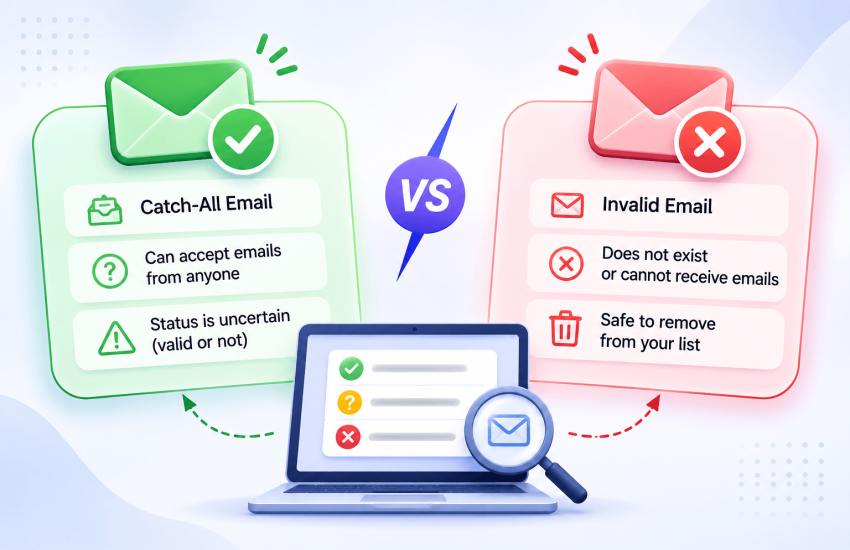
The short answer: an invalid email address does not exist, so mail to it will bounce. Remove it. A catch-all address belongs to a domain that accepts mail for every address, real or not, so a verifier cannot tell whether that one mailbox exists. It might be a real person. It might bounce later. It might land in an inbox nobody reads.
Invalid is a clear answer. Catch-all is an honest “we cannot know from the outside”. This guide explains how verifiers tell the two apart, why companies set up catch-all domains, and exactly what to do with catch-all addresses in your marketing, sales and signup flows.
How a verifier tells catch-all and invalid apart
An email verifier never sends a real email. Instead, it starts a conversation with the recipient’s mail server and asks, in effect, “would you accept mail for this address?” Then it stops before any message is sent. The server’s reply decides the result.
- Check the format and domain. Is the address written correctly? Does the domain exist, and does it have mail servers (MX records)? If not, the address is invalid.
- Ask about the real address. The verifier connects to the mail server and names the address as a recipient. A server that knows the mailbox replies with code 250 (accepted). A server that does not know it usually replies with code 550 and the enhanced status 5.1.1, which means “bad destination mailbox address”. A 550 5.1.1 reply is a clear invalid.
- Ask about a fake address. To be sure a 250 means something, the verifier also asks about a random address on the same domain that cannot exist, such as [email protected]. If the server rejects the fake address, its 250 for the real one can be trusted, and the address is valid. If the server accepts the fake address too, it accepts everything. The domain is catch-all, and the real address cannot be confirmed.
That third step is why catch-all is not a failure of the verifier. The server simply says yes to every address, so there is no “no” to listen for.
You can see this for yourself. Enter a domain in the free Catch-All Domain Checker to find out whether it accepts all mail, or check a single address with the Email Checker. For the full picture of this conversation, read SMTP Email Verification Explained.
Sources for the reply codes: RFC 5321 (SMTP) and RFC 3463 (enhanced status codes).
Catch-all vs invalid vs valid at a glance
| Valid | Catch-all | Invalid | |
|---|---|---|---|
| What the server said | Accepted the real address, rejected a fake one | Accepted the real address and a fake one | Rejected the address, or the domain has no mail server |
| Does the mailbox exist? | Yes | Unknown | No |
| Will mail bounce? | Not at the time of the check | It might, now or later | Yes |
| Who reads the mail? | The owner | The owner, a shared inbox, or nobody | Nobody |
| Default action | Send | Decide by source and engagement (see below) | Remove |
| Check again later? | Before big campaigns | Yes, with a deeper check | No |
The important column is the middle one. A catch-all result is neither good nor bad. It means you need more information before you send, and that information comes from the contact’s history with you or from a deeper check, not from the mail server’s reply.
Why companies use catch-all domains
Catch-all is a deliberate setting, usually on company domains rather than free providers like Gmail. Common reasons:
- Never miss a customer email. If someone types sales@ as sale@, the message still arrives somewhere.
- Keep mail for people who left. Messages to former employees land in a shared inbox instead of bouncing.
- Hide the staff directory. If every address is accepted, outsiders cannot test which addresses are real. Some email security gateways work this way for that reason.
These are good reasons for the company. They are a problem for anyone trying to verify an address at that company.
The risks of sending to catch-all addresses
- Late bounces. Some catch-all servers accept mail during the conversation and send a bounce message afterwards. These still count as bounces against your sender reputation.
- Mail nobody reads. Messages may sit in a default inbox that no one checks. That means no opens and no clicks, and mailbox providers read silence as a sign your mail is unwanted.
- Wasted spend. You pay to send, and often to store the contact, with nothing in return.
- Hard to clean later. Because catch-all addresses rarely bounce at the time, they can sit on your list for years and drag engagement down.
None of this means you should delete every catch-all address. Many belong to real buyers at real companies. It means you should treat them as a separate group with its own rules.
How to handle catch-all addresses
The right move depends on where the address came from and what you plan to send. Use this table.
| Situation | What to do with catch-all addresses |
|---|---|
| Signup form (real-time check) | Accept them. Blocking catch-all at signup turns away real people at real companies. Watch their first few emails for opens |
| Marketing list, contact engaged in the last 90 days | Send as normal. Recent opens and clicks prove someone reads that inbox |
| Marketing list, no engagement for 90 days or more | Hold them out of big campaigns. Send a small separate batch after the main send and remove anyone who bounces or never opens |
| Cold outreach or B2B prospect list | Run a deep catch-all check first. Send to the strongest results in small batches and keep volume per company low |
| Bought or rented list | Remove them. With no history and no consent, there is nothing to tell you the inbox is real |
Three rules for every case:
- Never test by blasting. Sending to every catch-all address at once to “see what bounces” can damage your sender reputation in a single send.
- Keep them in a separate segment. Tag catch-all contacts so you can track their bounce and open rates apart from the rest of your list.
- Remove non-readers. If a catch-all contact has not opened anything after several sends, remove them. Silence is the answer the server could not give you.
Going further: deep catch-all checks
A standard verifier stops at “catch-all”. MyEmailVerifier’s Deep Catch-All Checker goes a step further and scores each catch-all address individually, returning one of four results:
| Result | What to do |
|---|---|
| High Probability | Send, ideally in your engaged segment first |
| Low Probability | Send only in a small, monitored batch, or hold |
| Avoid | Remove from your list |
| Unknown | Could not be scored. MyEmailVerifier refunds the credits; re-check later or treat as Low Probability |
You can run it on the catch-all results of a bulk verification job, upload a list of catch-all addresses directly, or call it through the API. For more on acting on every verification status, see What to Do After Email Verification.
Catch-all and invalid email FAQ
What does catch-all mean in email verification?
Catch-all means the email’s domain accepts mail for every address, whether or not the mailbox exists. Because the server says yes to everything, a verifier cannot confirm that the specific mailbox is real. The address might be valid, or mail to it might bounce or go unread.
What is the difference between a catch-all and an invalid email?
An invalid email does not exist, so mail to it will bounce. A catch-all email is on a domain that accepts all addresses, so its status is unknown. Remove invalid addresses; decide on catch-all addresses based on how the contact joined your list and whether they engage.
Is it safe to send to catch-all email addresses?
It is safe for catch-all contacts who opted in and opened or clicked recently. For catch-all contacts with no recent engagement, send only in small, monitored batches, and remove anyone who bounces or never opens.
Should I remove all catch-all emails from my list?
No. Many catch-all addresses belong to real people at companies. Remove catch-all addresses from bought lists and from contacts who never engage, and keep the ones with a clear opt-in and recent activity.
Can a catch-all email bounce?
Yes. Some catch-all servers accept mail at first and send a bounce message later. Those late bounces still count against your sender reputation.
How do I check if a domain is catch-all?
Enter the domain in a catch-all domain checker, such as MyEmailVerifier’s free Catch-All Domain Checker. It tells you whether the domain accepts all email.
Why do email verifiers return catch-all instead of valid or invalid?
Because the mail server gives the same “accepted” reply for real and fake addresses. With no rejection to detect, an honest verifier reports catch-all rather than guessing. A deeper check can then score each catch-all address using other signals.
Sort out your catch-all addresses today
Start by finding out how many catch-all addresses you have. Sign up for MyEmailVerifier and verify your list with 100 free credits a day. Then run the catch-all results through the Deep Catch-All Checker to see which ones are worth sending to.

James P. is Digital Marketing Executive at MyEmailVerifier. He is an expert in Content Writing, Inbound marketing, and lead generation. James’s passion for learning about people led her to a career in marketing and social media, with an emphasis on his content creation.