 Posted by
Black Friday falls on November 27, 2026, and Cyber Monday on November 30. For most brands, these are the biggest sends of the year. They are also the sends most likely to land in spam.
The reason is simple. In November, most senders do three risky things at once:
- They send far more email than usual. A sudden jump in volume makes mailbox providers look harder at your mail.
- They wake up old contacts. People who have not opened an email in a year get added back to the holiday list. Many of those addresses are now dead, abandoned or turned into spam traps.
- They import new lists. Contest entries, pop-up signups and event lists arrive in a hurry and skip any checks.
Each of these adds bounces and spam complaints. Mailbox providers judge your domain by those signals. If your reputation drops in the week before Black Friday, your best offers can end up in spam on the day that matters most.
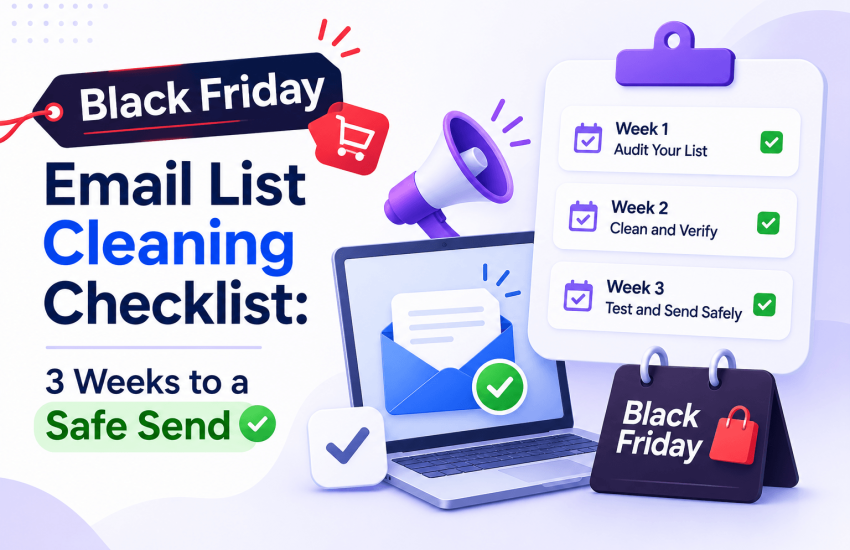
The fix is not complicated. Clean and verify your list before you send, and do it early enough to act on the results. The checklist below starts three weeks before Black Friday and ends the day after Cyber Monday. Each step links to a free MyEmailVerifier tool you can use right away.
The inbox rules your Black Friday send must pass
Gmail and Outlook.com treat anyone who sends 5,000 or more emails a day to their users as a bulk sender. Yahoo has its own bulk sender rules. A Black Friday campaign pushes many senders over that line for the first time.
|
Mailbox provider |
Authentication | Spam complaint rate | Unsubscribe | List hygiene guidance |
|---|---|---|---|---|
| Gmail | SPF, DKIM and DMARC | Keep below 0.1%; never reach 0.3% | One-click; honor within 48 hours |
Avoid sending unwanted email; enforcement ramped up from November 2025 |
|
Yahoo |
SPF, DKIM and DMARC (at least p=none, and it must pass) | Keep below 0.3% | Honor within 2 days | “Remove invalid recipients from your list promptly” |
| Outlook.com, Hotmail, Live | SPF, DKIM and DMARC | No published threshold | Required |
Non-compliant mail rejected since May 5, 2025 |
Two things in this table matter most before Black Friday:
- Gmail’s spam limit is tiny. At 0.3%, three complaints per 1,000 delivered emails is enough to break the rule. Gmail also says senders above 0.3% are not eligible for help with delivery issues until they stay under it for 7 days in a row. Seven days is the whole Black Friday to Cyber Monday window.
- Yahoo tells you to remove invalid addresses. That is list verification, in Yahoo’s own words.
You can check your SPF, DKIM and DMARC records in under a minute with the free SPF, DKIM and DMARC checker.
Sources: Google email sender guidelines FAQ, Yahoo sender best practices, Red Sift bulk sender requirements guide (for Outlook dates).
The Black Friday list cleaning checklist
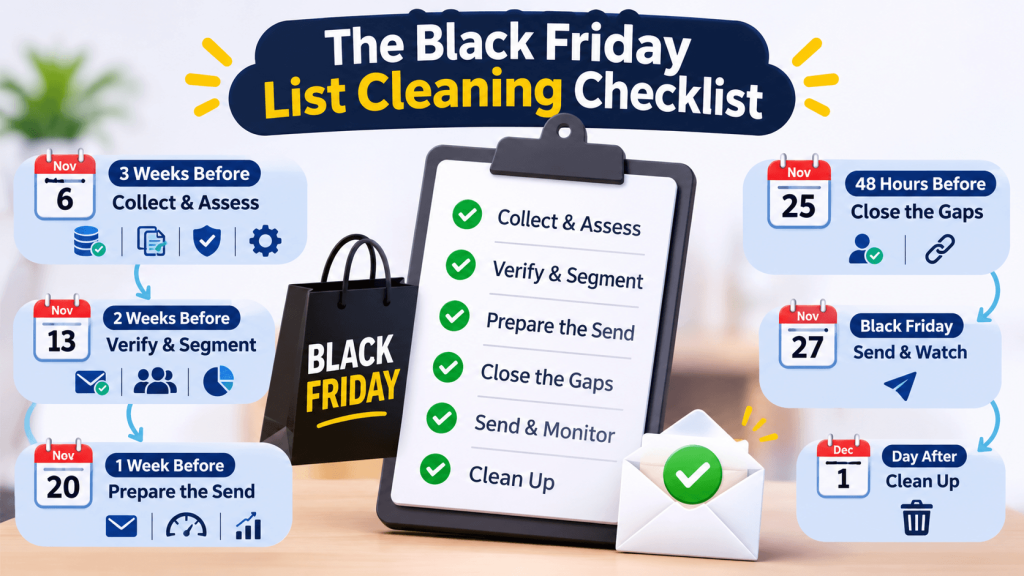
Work through these 15 steps in order. The dates assume Black Friday on November 27, 2026.
3 weeks before (by November 6): collect and assess
- Export every list you plan to mail. Include old segments, past customers, recent pop-up signups and any event or contest lists. You cannot clean what you have not gathered.
- Merge the lists and remove duplicates. The same person on two lists gets two emails, and two emails double the chance of a complaint. Paste your combined list into the free Duplicate Email Finder to get a unique list back.
- Grade a sample of the list. Run up to 500 addresses through the free Email List Health Grader. The A to F grade tells you how much cleaning work is ahead.
- Check your domain setup. Use the SPF, DKIM and DMARC checker on your sending domain. Fix any failure now. DNS changes can take time to spread.
2 weeks before (by November 13): verify and segment
- Verify the full list. Upload it to MyEmailVerifier for bulk verification. Each address comes back with a status such as valid, invalid, catch-all, disposable, role-based or unknown. Free daily credits let you start before you buy.
- Act on every result. Remove invalid and disposable addresses. Handle the risky groups as shown in the results table below. Do not send to anything you have not checked.
- Segment by engagement. Split valid contacts by their last open or click: 0 to 90 days, 91 to 180 days, 181 to 365 days, and more than 365 days.
- Reconfirm the sleepers. Send the 181 to 365 day group a short “Do you still want our deals?” email now, not on Black Friday. Yahoo recommends sending a reconfirmation email to inactive subscribers. Keep the people who click. Leave out the rest.
1 week before (by November 20): prepare the send
- Raise volume step by step. If your Black Friday send will be much bigger than a normal week, grow your daily volume over the days before it. Send to your most engaged segments first. Our email warm-up guide explains how to plan the ramp.
- Test your email copy. Paste your Black Friday email into the free Spam Score Checker. Fix spam trigger words, too many links and all-caps subject lines.
- Estimate your bounce risk. Plug your verification numbers into the free Bounce Rate Calculator to see what bounce rate to expect.
48 hours before (by November 25): close the gaps
- Verify every new address. Early-deal signups arrive all week. Verify everything added since step 5. To stop bad addresses at the door, add real-time email verification to your signup forms.
- Test your unsubscribe link. Gmail asks bulk senders to support one-click unsubscribe and honor requests within 48 hours. A broken link turns unsubscribes into spam complaints.
Black Friday and Cyber Monday: send and watch
- Send in waves, engaged first. Mail your 0 to 90 day segment first. Watch bounces and complaints in the first hour. If either jumps, pause and check before sending more.
The day after Cyber Monday (December 1): clean up
- Remove what failed. Suppress every hard bounce and every complaint right away. Then check your domain in Google Postmaster Tools. Our guide to Postmaster Tools v2 explains what to look at now that reputation scores are gone.
What to do with each verification result before Black Friday
Verification only helps if you act on it. Use this table for step 6.
|
Result |
What it means | Black Friday action |
|---|---|---|
|
Valid |
The mailbox exists and accepts mail |
Send. Put recent openers in your first wave |
|
Invalid |
The mailbox does not exist |
Remove now. Every one becomes a hard bounce |
|
Disposable |
A temporary inbox that expires |
Remove from marketing sends. Nobody will read it |
|
Catch-all |
The domain accepts all mail, so the mailbox cannot be confirmed | Send only if the contact engaged in the last 90 days. Otherwise hold for a small batch after your main send |
| Role-based (info@, sales@) | A shared inbox, not one person |
Keep only if they opted in and engage. Several people read a shared inbox, so any one of them can report you |
|
Greylisted |
The mail server asked the checker to try again later |
Verify again in a few hours |
| Unknown | The mail server did not answer |
Verify again. If it is still unknown, leave it out of the Black Friday send |
Catch-all domains are the hardest group to judge. Our guide on what to do with catch-all emails explains the trade-offs, and the deep catch-all email checker runs extra checks on these addresses. For a full walk-through of every status, read Understanding Email Verification Results and What to Do After Email Verification.
6 mistakes that wreck holiday deliverability
- Buying or renting a list for the holidays. Bought contacts never asked to hear from you. Gmail tells bulk senders to avoid unwanted or unsolicited email, and bought lists are full of both.
- Waking up every old contact on Black Friday itself. A year of silence followed by a big promo is a recipe for complaints. Reconfirm sleepers two weeks early instead (step 8).
- Verifying the night before. You need time to remove bad addresses, re-check unknowns and segment. Verify at least two weeks out.
- Putting risky addresses in your first wave. Catch-all, role-based and unknown addresses belong in a small later batch, if anywhere.
- Switching domains or email platforms in November. A new sending domain or IP has no reputation yet. Black Friday is the worst week to start building one.
- Skipping the clean-up. Hard bounces and complainers left on the list will hurt your December and January sends too.
Black Friday email list cleaning FAQ
When should I clean my email list before Black Friday?
Clean and verify your list at least two weeks before Black Friday. For 2026, that means by November 13. Two weeks gives you time to remove bad addresses, re-check unknown results and reconfirm inactive subscribers before the big send.
What spam complaint rate is safe for a Black Friday campaign?
Keep complaints below 0.1% for Gmail and never let them reach 0.3%. Yahoo’s limit is also 0.3%. That is three complaints per 1,000 delivered emails, so a single bad segment can push you over.
Should I email inactive subscribers on Black Friday?
Not without reconfirming them first. Send inactive contacts a short reconfirmation email two weeks earlier. Keep the ones who click and leave the rest out of your Black Friday send.
Is it safe to send Black Friday emails to catch-all addresses?
Only to catch-all contacts who opened or clicked in the last 90 days. A catch-all domain accepts all mail, so verification cannot confirm the mailbox exists. Send the rest in a small batch after your main send, or skip them.
Does email verification stop spam complaints?
No. Verification removes invalid, disposable and risky addresses, which cuts bounces. Complaints come from real people who no longer want your mail. Reconfirming inactive subscribers and making unsubscribing easy is what lowers complaints.
What bounce rate is too high?
Gmail and Yahoo do not publish a bounce rate limit, but each email platform sets its own and can pause accounts that exceed it. Check your platform’s policy and aim to send with almost no invalid addresses. Our guide to reducing your email bounce rate covers targets in detail.
Can I verify my email list for free?
Yes, for small jobs. Check single addresses with the free Email Checker, grade up to 500 addresses with the Email List Health Grader, and use free daily credits for bulk verification. Larger lists need paid credits.
Start cleaning your Black Friday list today
You have until November 13 to verify your list with time to act on the results. Start with a free check: paste a sample into the Email List Health Grader to see your grade, then sign up for MyEmailVerifier and verify the full list with your free daily credits.

James P. is Digital Marketing Executive at MyEmailVerifier. He is an expert in Content Writing, Inbound marketing, and lead generation. James’s passion for learning about people led her to a career in marketing and social media, with an emphasis on his content creation.