 Posted by
 | Quick answer:
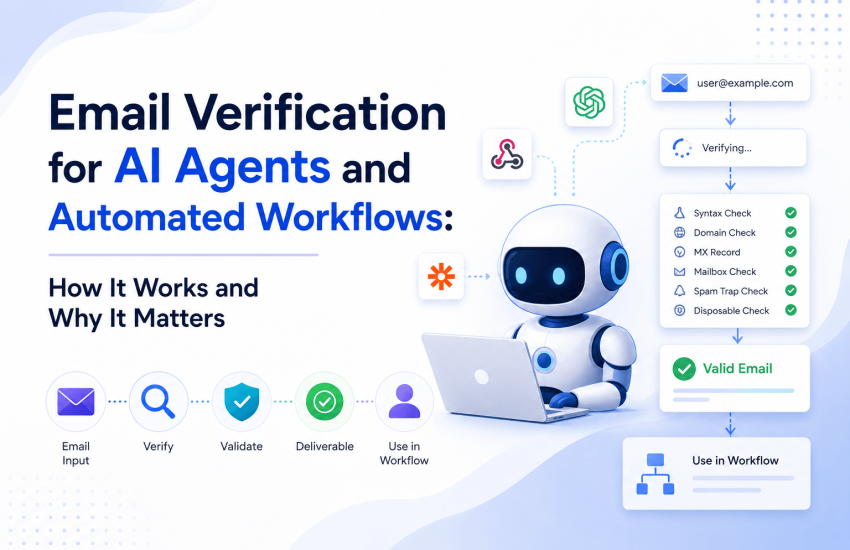
An email verification API confirms whether an address can receive mail before you send anything, using a four-step technical pipeline: syntax check, MX record lookup, SMTP mailbox handshake, and a risk layer for catch-all, disposable, and role-based addresses. It matters far more for AI agents than for people because an autonomous workflow has no human to catch a bad address, so one invalid contact repeats as an error at every downstream step. Real-time verification at the point of capture is the fix. Full verification drops bounce rates from an 8 to 12 percent industry average on unverified B2B lists to under 2 percent, the level below which Gmail and Microsoft stop throttling your domain. |
By 2026, most outreach, lead qualification, onboarding, and support routing will rely on AI agents and no-code automations rather than people. Because each system uses an email address as its core identity, email data quality becomes a critical, ongoing concern rather than an occasional cleanup task. This guide explains how verification works at the protocol level, why poor data is riskier for agents, where to implement verification in your stack, and the limitations to consider. It is designed to support informed decision-making beyond simple feature comparisons.
Why does one bad email address hurt an AI agent more than a person
For a person, a wrong address is a minor inconvenience; they notice the typo and move on, containing the error. In contrast, an autonomous workflow processes the list without oversight, acts on unverified data, and allows a single bad record to propagate throughout the system.
In a typical agent workflow, capturing a lead, enriching data, sending a sequence, booking a meeting, and updating the CRM, an invalid email at the outset leads the agent to enrich irrelevant data, send messages that bounce, log activity against inactive contacts, and report seemingly normal results. The error remains hidden and compounds over time, shifting the issue from correcting minor typos to enabling automation based on inaccurate information at scale.
Data show that only about 62 percent of email addresses submitted via online forms are valid, and disposable signups account for approximately 12 percent of registrations, according to industry reports. Nearly four in ten form submissions are therefore risky before any agent interaction, and while a human may notice these issues, an agent does not.
What email verification actually checks: the four-step pipeline
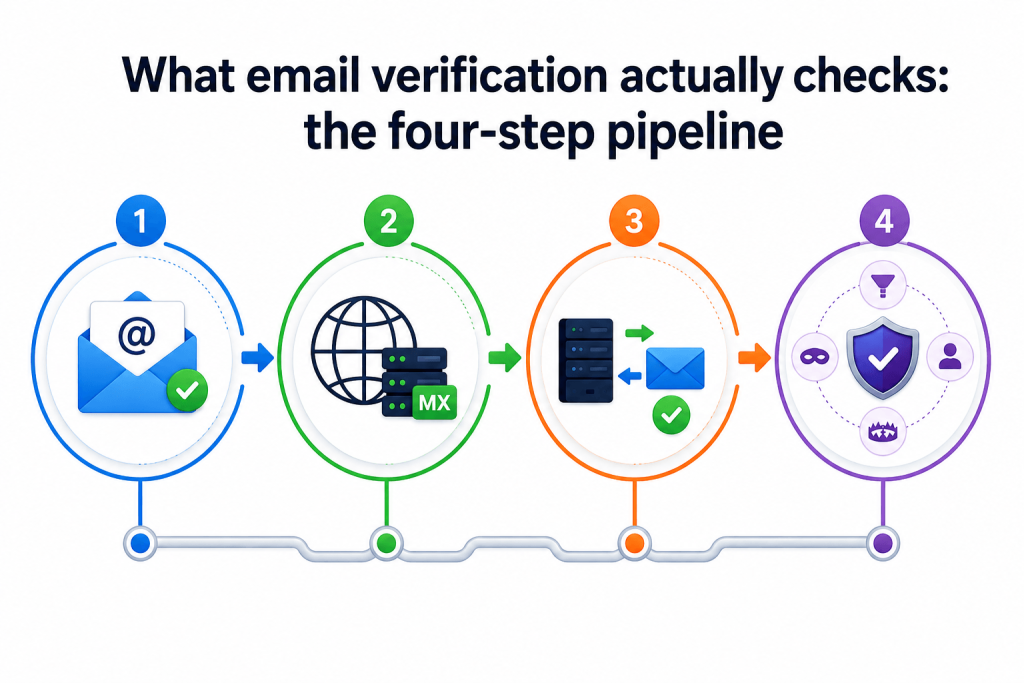
Verification is a multi-step process that progressively filters out bad addresses. It starts with the most cost-effective checks and never sends an actual message. Understanding each stage clarifies what the results can and cannot guarantee.
Step 1: Syntax validation (RFC 5322)
The initial check ensures the address complies with the RFC 5322 formatting standard, identifying issues such as missing @ symbols, illegal characters, double dots, and addresses exceeding 254 characters (Cleanlist). This step is immediate and low-cost, so it is performed first. However, relying solely on syntax and MX checks identifies only 70 to 90 percent of bad addresses, compared to 95 to 99 percent with full verification (Cleanlist).
Step 2: Domain and MX record lookup
Next, the verifier performs a DNS lookup for the domain’s MX (Mail Exchange) records, which name the servers responsible for receiving mail for that domain. There are three outcomes, per EmailAwesome’s MX lookup guide: MX records present and resolving means the domain can receive mail and the address proceeds to the SMTP stage; MX records present but the server is unreachable means the address is classified risky or unknown, not hard-invalid, because the infrastructure may recover; no MX records means every address at that domain is undeliverable immediately, with no SMTP probe attempted.
This stage also identifies typo domains such as gmial.com or gogle.com. It is efficient at scale, as a list of 50,000 contacts typically includes only 3,000 to 5,000 unique domains, allowing the verifier to resolve each domain once. MX failures are a primary cause of hard bounces in B2B lists, often occurring when companies change providers or let domains lapse, resulting in MX records failing to resolve before addresses are officially abandoned.
Step 3: The SMTP mailbox handshake
This is the core of verification and the most misunderstood step. SMTP, the protocol mail servers use, has no official command to ask whether a mailbox exists. The old VRFY command was designed for exactly this, but nearly all servers now refuse it to prevent abuse, which makes it unusable, per AbstractAPI’s SMTP and MX guide.
Verifiers initiate the SMTP delivery handshake and stop before transmitting any message. As described by BigDataCloud, the verifier connects to the mail server, identifies itself, and issues the RCPT TO command for the target address. The server’s numeric SMTP status code indicates whether it would accept mail for that mailbox. No message body is sent; this is known as a zero-payload or partial handshake. As Email Hippo states, the verifier interacts with the server without sending an actual email.
| Why fresh checks beat cached databases
An address that was valid three months ago may have been deactivated when an employee left. Some servers do not immediately drop retired mailboxes, so a stale database can still report valid while the address hard-bounces on delivery. This is why live SMTP checks against the recipient server, rather than lookups against a cached list, produce more reliable results. MyEmailVerifier runs a fresh live check on each request rather than returning stored results. |
Step 4: The risk layer (catch-all, disposable, role-based, traps)
Beyond confirming existence, a quality verifier adds further checks that SMTP cannot address. It uses maintained lists and heuristics (EmailVerify.io; Mailmeteor).
- Disposable detection. Flags throwaway domains such as Mailinator, Guerrilla Mail, and ten-minute services used to bypass trials or commit fraud.
- Role-based detection. Flags addresses like info@, sales@, and admin@ that reach a group rather than a person, skewing engagement metrics.
- Catch-all detection. Tests whether the domain accepts mail for any address, which changes how you read a valid result (covered next).
- Spam trap and blacklist screening. Identifies honeypots and blacklisted addresses that can damage the sender’s reputation on contact.
- Greylisting detection. Recognizes temporary server defenses so you can manage retry logic instead of misreading a delay as a failure.
The catch-all problem, and why no tool fully solves it
A catch-all domain accepts mail for any address, regardless of whether the specific mailbox exists. As a result, the SMTP handshake returns a positive response for all addresses at that domain, including those not assigned to real users (EmailAddress.ai). The verifier cannot confirm individual mailboxes and therefore reports such addresses as catch-all or risky, not as invalid.
| Honestly, other guides skip
No SMTP-based verifier can definitively confirm a specific mailbox inside a catch-all domain. This is a limitation of the protocol, not of any one vendor, and catch-all domains are common in B2B. MyEmailVerifier, like other SMTP-based tools, flags catch-all as its own category. The correct response is to treat catch-all contacts as a separate segment and send to them cautiously, not to expect any tool to make the uncertainty disappear. Any vendor claiming to fully resolve catch-all with certainty is overstating what SMTP allows. |
What a verification result looks like
A verification API returns a structured result your application can branch on, typically a primary status and a more granular sub-status. A representative JSON response looks like this:
| {
“email”: “[email protected]”, “status”: “valid”, // valid | invalid | catch-all | unknown | disposable | role-based “sub_status”: “mailbox_exists”, “free_provider”: false, “role_based”: false, “disposable”: false, “mx_found”: true } |
The main statuses to handle are: valid (safe to send), invalid (do not send, remove), catch-all (uncertain, segment and send cautiously), unknown (no definitive server response, retry later), disposable (block for signups and trials), and role-based (exclude from personal outreach). MyEmailVerifier provides these as separate categories in a ready-to-use file, allowing workflows to route each group appropriately without additional processing.
Real-time versus bulk verification: when to use each
Verification APIs operate in two modes. Choosing the wrong mode can either slow your application or allow bad data to accumulate between cleanups.
|
When it runs |
At the moment of capture: form, signup, CRM create | Periodically, before a campaign or after an import |
|
Speed need |
Must be sub-second so it does not add friction |
Minutes to hours is acceptable |
|
Best for |
Signup forms, agent workflows, and CRM hygiene at entry |
Cleaning existing lists before a send |
| Risk if skipped | Bad data enters and propagates through automation |
Decayed addresses bounce on your next send |
Speed is essential for real-time verification. Public API response times typically range from under 50 milliseconds to several hundred milliseconds; for example, one vendor reports 444 milliseconds while returning multiple data points per address (Email Hippo). At signup, delays of more than 1 second are noticeable to users. Most teams require both modes: real-time verification at entry to block new bad data, and bulk verification before sending to catch addresses that have become invalid over time.
Where to put verification in an AI agent or automation stack
Verification pays off most when it sits at the points where bad data enters or is acted on. There are three places to put it.
1. At the point of capture
Validate email addresses immediately upon submission, whether on a form, signup, or checkout. Detecting typos or disposable domains in real time prevents them from entering your CRM and causing future bounces. This proactive approach is the most effective way to prevent issues before they arise.
2. Before an automated send or agent action
Re-verify contacts before an agent initiates a sequence. Since verified status can become outdated as people change jobs or abandon accounts, checking before sending protects your sender reputation. This distinguishes an agent that sends to a clean list from one that risks damaging your domain.
3. Inside no-code automation platforms
Custom engineering is not required to add a verification step. Use automation platforms such as Zapier to route new contacts through verification before they proceed in the workflow. For teams using newer agent protocols, apply the same principle: place a verification call between data capture and any autonomous action.
The numbers that justify verification
Verification is often overlooked until the costs of unverified sending become clear. Data from multiple sources consistently supports this.
- Bounce rate. Full verification drops bounce rates from the 8 to 12 percent industry average on unverified B2B lists to under 2 percent, based on Cleanlist’s analysis of 2.1 million B2B records in Q1 2026.
- The throttling threshold. A bounce rate under 2 percent is the level below which Gmail and Microsoft stop throttling your sending domain, per the same analysis. Cross it, and your delivery degrades for everyone on your list.
- Detection rate. Full verification catches 95 to 99 percent of bad addresses; syntax-and-MX-only tools catch just 70 to 90 percent.
- Data entry quality. Only 62 percent of submitted form emails are valid, and 12 percent of signups are disposable, according to industry reports.
- Recovery cost. A bad send can leave a reputation crater that takes 30 to 60 days to recover from, per Cleanlist. Prevention is far cheaper than recovery.
- Market direction. The email verification software market is growing at a 10.4 percent CAGR, from $0.71 billion in 2025 to $0.79 billion in 2026, driven by demand for real-time and API solutions, per Research and Markets.
Honest limitations you must design around
Verification is essential but not foolproof. Ignoring its limitations can lead to failure. Design your processes with these constraints in mind.
- Verified does not mean inbox. Verification confirms an address can receive mail. It does not guarantee inbox placement, which also depends on authentication (SPF, DKIM, DMARC), sending behavior, and engagement. See our authentication guide.
- Results decay. A valid result is a snapshot. Addresses go dead over time, so re-verify before major sends rather than trusting an old check.
- Catch-all stays uncertain. As covered above, no tool fully resolves individual mailboxes on catch-all domains.
- Greylisting can cause unknowns. Some servers deliberately delay unfamiliar connections, which return an unknown status. Retry logic, not a reclassification, is the fix.
- Rate limits are real. Mail servers throttle repeated probes, which is one reason large lists take time and why reputable verifiers pace their checks.
A practical integration checklist
- Implement real-time verification at every data-capture point, including forms, sign-ups, and checkout.
- Branch your logic on status: accept valid, reject invalid and disposable, segment catch-all, retry unknown, exclude role-based from personal outreach.
- Re-verify lists in bulk before any campaign or agent-driven send.
- Include a verification step in automations before any enrichment or outreach.
- Pair verification with SPF, DKIM, and DMARC so authenticated mail reaches a clean list.
- Monitor bounce and complaint rates after launch, and take corrective action if the bounce rate approaches 2 percent.
What to look for in a verification API
- Ensure real-time responses occur within sub-second timeframes to avoid adding friction to the signup validation process.
- Structured, branchable output with clear statuses and sub-statuses.
- Use live verification checks rather than relying on cached database lookups.
- Select solutions with transparent, predictable pricing that does not penalize high-frequency usage.
- Prioritize privacy by choosing providers that do not store submitted addresses long-term.
- Require honest handling of catch-all addresses rather than solutions that offer false certainty.
On these criteria, MyEmailVerifier offers a self-serve JSON API at a published $0.0025 per request, 100 free credits per day that never expire, live server checks with no stored results, and category-separated output. Review the details in our email verification API pricing guide.
Frequently asked questions
Does email verification send a real email?
No. Verification performs a partial SMTP handshake that stops before any message is transmitted. The mail server’s response indicates whether the mailbox would accept mail, but nothing is ever delivered to the recipient.
How accurate is email verification?
Full verification catches 95 to 99 percent of bad addresses, versus 70 to 90 percent for tools that only check syntax and MX records. Accuracy varies by list composition, especially the share of catch-all domains, so test a sample of your own data first.
What is a catch-all address and why is it risky?
A catch-all domain accepts mail for any address, so the server confirms every address as acceptable even when the specific mailbox does not exist. No SMTP-based verifier can fully resolve this, so catch-all addresses are flagged as risky and should be segmented rather than sent at scale.
Can I add verification to an AI agent without custom code?
Yes. Route new contacts through a verification step using an automation platform such as Zapier, so the check runs before any enrichment or outreach the agent performs.
Is real-time or bulk verification better?
They solve different problems. Real-time verification stops bad data at the point of capture, while bulk verification cleans existing lists before a send. Most teams need both.
Does a valid result guarantee that my email will reach the inbox?
No. Verification confirms an address can receive mail. Inbox placement also depends on authentication, sending behavior, and recipient engagement.
How fast is real-time verification?
Well-built APIs respond in the sub-second range, often under 100 milliseconds per lookup, which is fast enough for signup forms.
Related reading
- How AI email verification accuracy is measured
- Preventing fake signups in SaaS products
- The complete bulk email verification guide
- SPF, DKIM, and DMARC explained

James P. is Digital Marketing Executive at MyEmailVerifier. He is an expert in Content Writing, Inbound marketing, and lead generation. James’s passion for learning about people led her to a career in marketing and social media, with an emphasis on his content creation.