 Posted by
 The average professional sends and receives 121 emails every single working day, yet almost none of them were ever formally taught how to do it well. The result is inboxes full of confusing subject lines, reply-all disasters, walls of unbroken text, and emails that never get a response.
Poor email habits do more than annoy colleagues. They quietly hurt your reputation, reduce replies, and, if emailing at scale, harm sender reputation and send messages to spam before they’re read. Adhering to effective email etiquette improves how you are perceived by coworkers and increases the likelihood that your important messages reach their intended recipients and elicit the responses you want.
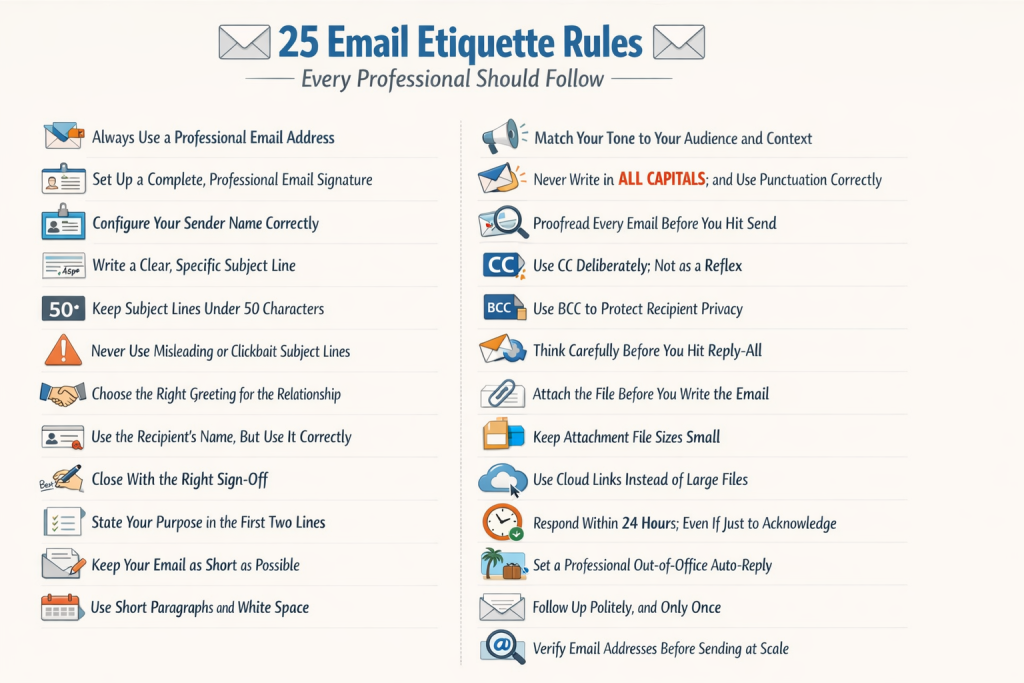
This guide gives you 25 practical, immediately actionable email etiquette rules. For each rule, you will find a clear explanation, real good-versus-bad examples, and ready-to-use templates where relevant. At the end, you will find a ten-point pre-send checklist you can use before every important email you ever write.
Whether you are a sales professional crafting cold outreach, a marketer running email campaigns, a recruiter reaching out to candidates, or simply someone who wants to come across as polished and professional, these rules apply to you.
What You Will Learn in This Guide
|
What Is Email Etiquette?
Email etiquette refers to the set of guidelines and professional standards that govern how emails should be written, formatted, and sent. These rules cover everything from choosing the right subject line and greeting to structuring your message clearly, managing CC and BCC fields correctly, and responding within an appropriate timeframe. Following email etiquette shows respect for your recipient’s time, protects your professional reputation, and significantly increases the likelihood that your emails will be read, understood, and replied to.
| Why Email Etiquette Matters More Than You Think
A study by Adobe found that workers spend an average of 3.1 hours per day on email. That means a significant portion of how others perceive your professionalism is shaped entirely by the quality of your written communication. Beyond first impressions, poor email habits at scale, such as sending to unverified addresses, using spam trigger words, or ignoring bounce management, can permanently damage your sender reputation and get your domain blacklisted. |
Section 1: Email Address, Signature, and Identity (Rules 1–3)
Before you write, two things shape whether your email gets opened: your sender name and email address. These form an instant trust signal to recipients.
Rule 1: Always Use a Professional Email Address
Your email address is your digital first impression. An address like [email protected] or [email protected] signals to recipients and spam filters that you are not to be taken seriously. If your company provides a branded email address ([email protected]), use it exclusively for work communication.
If you are a freelancer or founder without a company domain, make a professional email address using your name: [email protected] is better than a username or nickname. Better, buy a custom domain and use Google Workspace or Microsoft 365; this also boosts deliverability.
| [email protected] | |
| [email protected] | |
| [email protected] |
Learn how to validate email addresses with our latest and most effective tricks. Know the valid email address formats and never worry again.
Rule 2: Set Up a Complete, Professional Email Signature
An email signature is not optional; it is a professional standard. Every work email should include a signature that identifies you and provides contact information. A missing or poor signature creates friction and casts doubt on your credibility.
Your Email Signature Should Include:
|
Keep your signature clean and simple. Avoid large images, GIFs, or banner ads; these make emails heavier, slow load times, and may trigger spam filters.
Rule 3: Configure Your Sender Name Correctly
Your sender name, the display name in your recipient’s inbox before they open your email, is your strongest tool for improving open rates. Most professionals overlook it.
Use your full real name, or your name plus your company, depending on context. Avoid vague sender names like ‘Sales Team’ or ‘No Reply’ for personal communication. For bulk campaigns, a format like ‘James at AcmeCorp’ consistently outperforms generic labels in open rate tests because it feels human.
|
No-Reply |
James Harrison |
| Sales |
James at AcmeCorp |
| admin123 |
James Harrison; AcmeCorp |
Section 2: Subject Line Etiquette (Rules 4–6)
Your subject line determines whether your email gets opened, ignored, or reported as spam. According to Litmus research, 47% of recipients decide to open or delete an email based solely on the subject line. Getting this right is not optional.
Rule 4: Write a Clear, Specific Subject Line
A great subject line states exactly what the email is about and why it’s worth opening now. Vague subjects waste time and get ignored.
Apply the BLUF (Bottom Line Up Front) principle: state the main point first. If your email needs action, say so. For replies, keep the thread subject unchanged.
|
Following up |
Following up on the Q3 proposal, please confirm by Friday |
| Hello |
Introduction: James Harrison, AcmeCorp partnerships |
| Question |
Quick question about your API pricing: 2 mins |
| Meeting |
Can we meet on Thursday at 2 pm to discuss the onboarding plan? |
Rule 5: Keep Subject Lines Under 50 Characters
Most email clients display between 33 and 60 characters of a subject line before truncating it. On mobile devices, where over 60% of emails are now first opened, the visible window shrinks to 30–40 characters. Write your subject lines with mobile in mind first.
The sweet spot is 40–50 characters. If your subject line is longer, front-load the most important words so the key message survives truncation.
|
Gmail (desktop) |
~77 characters |
Under 60 characters |
|
Gmail (mobile) |
~30–40 characters | Under 40 characters |
|
Apple Mail (desktop) |
~60–80 characters |
Under 60 characters |
|
iPhone Mail |
~35 characters |
Under 35 characters |
|
Outlook (desktop) |
~60 characters |
Under 50 characters |
Rule 6: Never Use Misleading or Clickbait Subject Lines
Subject lines like ‘Re: Our call last week’, when there was no call, or ‘You won’t believe this offer’ are not just annoying. They are a serious violation of email etiquette and, in many jurisdictions, a violation of anti-spam law (CAN-SPAM, GDPR).
Beyond the legal and ethical issues, deceptive subject lines destroy trust instantly. When a recipient realizes the subject line lied to get them to open, they will mark your email as spam. In bulk email, even a small increase in spam complaints can damage your sending domain’s reputation for months.
| Spam Filter Warning
Certain subject line patterns actively trigger spam filters before your email even reaches the inbox. All-caps words (FREE, URGENT, ACT NOW), excessive punctuation (!!!), and phrases like ‘Click here’ or ‘Limited time offer’ are among the highest-risk triggers. Write subject lines as if a human colleague would read them, because the spam filter is essentially doing exactly that. |
Section 3: Greetings and Sign-Offs (Rules 7–9)
The opening line of your email sets the tone. Get it right, and the reader is at ease. Get it wrong, or skip it, and you create instant friction.
Rule 7: Choose the Right Greeting for the Relationship
Not all greetings are equal, and using the wrong one for the context signals poor social awareness. The safest default for any professional email where you are unsure of the formality level is ‘Hi [First Name],’; it is warm, professional, and universally appropriate across industries.
|
Very formal |
Legal, government, first contact with senior executive |
Dear Mr. Harrison, |
|
Formal |
First cold outreach, external partners, clients |
Dear James, |
|
Professional |
Most workplace and B2B emails ;the safe default |
Hi James, |
|
Semi-casual |
Colleagues you interact with regularly |
Hello James, or Hey James, |
|
Casual |
Close teammates, internal chats you know well |
Hey James! or Morning James, |
Rule 8: Use the Recipient’s Name; But Use It Correctly
Using a name in a greeting creates an instant connection. However, common mistakes can undermine this:
- Misspelling the name; always double-check. Using ‘Micheal’ instead of ‘Michael’, for example, shows you did not take the time to verify.
- When a mail merge fails, the dreaded ‘Hi {First Name},’ or ‘Hi [Name],’ appears in a template.
- Using a formal name when someone signs off informally; if someone signs their emails ‘Mike’, do not address them as ‘Michael’.
- Skipping the name in cold outreach is one of the clearest signals of a bulk, impersonal email.
For emails to international recipients: if you are unsure how to address someone from a different culture, whether to use their family name or given name, and which comes first, a polite fallback is ‘Dear [Full Name]’ until they correct you.
Rule 9: Close With the Right Sign-Off
Your sign-off is the last thing your recipient reads. It shapes how they feel about your email as a whole. Match it to the relationship and context, and keep it consistent; a professional sign-off every time signals reliability.
|
Best regards |
First contact, external partners, clients |
Very casual internal emails |
|
Kind regards |
Follow-ups, replies to people you’ve met before | Overly formal legal contexts |
| Thanks | When you are genuinely asking for something |
As a generic closer with no reason to thank |
|
Best |
Regular professional contacts, B2B peers | First cold contact; too casual |
| Cheers | Internal teams, friendly professional relationships |
Client-facing or formal contexts |
|
Sincerely |
Formal complaints, legal correspondence |
Every day work email; overly stiff |
Section 4: Writing the Message (Rules 10–15)
The body of your email is where most professional communication breaks down. Messages are too long, unclear, unstructured, or poorly toned. The six rules in this section will transform how you write the message itself.
Rule 10: State Your Purpose in the First Two Lines
No one reads an email to find out its purpose at the end. State why you are writing and, if needed, what you need from the recipient in the first two sentences. This respects their time, avoids clarification, and boosts your reply rate.
This principle, called BLUF (Bottom Line Up Front), is used by military and corporate communicators alike. The context and background can follow the purpose; never precede it.
|
Hope you are doing well! I wanted to reach out and touch base about a few things we discussed at the conference last month. There were a couple of action items I was reflecting on… |
I am writing to confirm the three action items from our October conference call: (1) you will send the contract draft by 15 Nov, (2) we will schedule onboarding for 22 Nov, (3) I will introduce you to our CTO this week. Could you confirm these by Friday? |
|
Following up on my last email. Just wanted to make sure you got it and see if there are any updates. |
Following up on my 2 November email about the contract draft ;could you let me know the revised timeline? Happy to jump on a quick call if that is easier. |
Email Copywriting tricks and tips, Keep the following marketing copy-writing tips in mind while creating your next email campaign
Rule 11: Keep Your Email as Short as Possible
If your email can be two sentences, write two. If it must be ten, write ten, but no more. Every extra line increases the chance the email will not be fully read or understood.
A useful test: could this email be replaced by a one-line Slack message or a 60-second phone call? If yes, choose that channel instead. Email is best suited to communication that requires a written record, structured information, or asynchronous delivery.
| The 5-Sentence Email Rule
Popularised by Guy Kawasaki, the 5-sentence email framework states: every email should be no longer than five sentences. Each sentence serves a purpose: (1) context, (2) your request or reason for writing, (3) supporting detail if needed, (4) what you need from them, (5) a clear close. Try applying this to your next ten emails. Most people find they never go back. |
Rule 12 Use Short Paragraphs and White Space
A wall of text makes busy people skip your email. Use short paragraphs, two to four sentences, and leave a blank line between each. This makes your email easy to scan and provides visual breaks for the reader.
When listing multiple items, use a numbered or bulleted list rather than cramming them into a sentence. If you have three questions, list them as three separate numbered points. This alone can cut reply times significantly because the recipient knows exactly what they need to respond to.
Rule 13: Match Your Tone to Your Audience and Context
Tone is one of the hardest aspects to control in writing, and one of the easiest to misjudge. Without vocal cues or body language, words that seem neutral to the writer can appear cold, passive-aggressive, or rude to the reader.
The most common tone mistake in professional emails is accidental curtness. Short, clipped responses like ‘Fine,’ ‘Done,’ or ‘See below’ technically convey information, but they read as dismissive or irritated. Add one word of warmth: ‘ Great, done.’ or ‘See my notes below; let me know if you have questions.’ ;and the tone transforms entirely.
|
Noted. |
Noted; thanks for flagging this. I will get it sorted today. |
| This is wrong. Please fix it. |
I noticed a discrepancy in the figures on page 3; the Q3 total should be $48,200, not $42,800. Could you update that and resend? |
|
As per my last email… |
I wanted to follow up on my email from Tuesday; apologies if it got buried. Could you let me know your timeline on this? |
| Why hasn’t this been done yet? |
I want to make sure this gets resolved before the end of the week; is there anything blocking progress I can help with? |
Read: Impact of GDPR on Email Marketing: Deep Points Discussed
Rule 14: Never Write in All Capitals; and Use Punctuation Correctly
WRITING IN ALL CAPITALS IS THE TEXTUAL EQUIVALENT OF SHOUTING. Even if that is genuinely how you feel, all-caps emails are harder to read, come across as aggressive or unprofessional, and frequently trigger spam filters in bulk email tools.
Similarly, overusing exclamation marks undermines your professional tone. One exclamation mark in an email is enthusiastic. Five is overwhelming. None at all is perfectly professional. Use bold text to emphasise a specific word or phrase if you need to draw attention to something ;it achieves the same effect without aggression.
Formatting Quick Rules
|
Rule 15: Proofread Every Email Before You Hit Send
Typos, grammar errors, and factual mistakes in professional emails are avoidable, and they leave a lasting impression. Before you send any important email, read it once from top to bottom out loud. Reading aloud catches awkward phrasing, missing words, and sentences that make sense in your head but not on screen.
For high-stakes emails to clients, investors, or senior leadership, paste the text into Grammarly or run a spell-check pass in your email client before sending. For bulk campaign emails, always send a test to yourself first, check rendering on both mobile and desktop, and verify that all personalisation fields (first name, company name) are pulling correctly from your list.
Pre-Proofread Checklist (for every email)
|
Section 5: CC, BCC, and Reply-All (Rules 16–18)
CC, BCC, and Reply-All are the three most misused features in every professional email client. Misusing them wastes colleagues’ time, embarrasses you in front of clients, and, in some cases, creates real privacy and legal problems.
Rule 16 Use CC Deliberately; Not as a Reflex
CC (carbon copy) should be used only when the recipient genuinely needs to be informed about the email’s content; not to cover yourself, show that you are working, or loop in someone as a passive audience member. Every person you add to CC receives every subsequent reply in the thread. This creates inbox noise for people who do not need it.
|
Your manager asked to be kept in the loop on a client project |
Yes | They have a stated need to be informed |
|
Introducing two people who should connect |
Yes |
Classic CC introduction; then remove yourself from further replies |
|
Wanting to show your boss you responded to something |
No |
This is performative CCing; it creates noise and erodes trust |
|
Emailing a client while your colleague needs context |
Yes |
Clear business reason for the additional recipient |
| You are not sure if someone needs to know | No |
When in doubt, leave them out. Forward separately if needed. |
Rule 17 Use BCC to Protect Recipient Privacy
BCC (blind carbon copy) has two important uses: protecting recipient privacy in group emails, and managing bulk outreach without exposing your list.
When you send an email to multiple people who do not know each other, a newsletter, an event invitation, or a job application round, use BCC for all recipients rather than CC. CCing everyone exposes all their email addresses to strangers, which is a GDPR and CAN-SPAM compliance issue in many contexts, and is widely considered poor etiquette.
| The Golden Rule of BCC
Only use BCC transparently. Using BCC to secretly add your manager to an email without the primary recipient’s knowledge, known as ‘BCC tattling,’ is a significant breach of professional trust. If discovered, it damages relationships and your reputation far more than whatever you were trying to achieve. |
Instantly check if an email address is a temporary or burner email. Our free temp email checker identifies throwaway addresses to keep your email list clean.
Rule 18: Think Carefully Before You Hit Reply-All
Reply-All is the single most overused feature in professional email. Before you click it, ask yourself one question: Does every single person on this thread actually need to read what I am about to write?
If your answer is yes, Reply-All is correct. If your answer is ‘I just want to confirm I received this’ or ‘I only need to respond to the sender’, hit Reply, not Reply-All. Email threads involving 20 people, where 15 are receiving replies irrelevant to them, are a major source of inbox frustration in every organisation.
|
Reply-All to a company-wide email to say ‘Thanks for sharing!’ |
Reply directly to the sender only, or do not reply at all |
| Reply-All to confirm attendance at a meeting when only the organiser needs to know |
Reply to the organiser directly |
|
Reply-All to a client thread to update all stakeholders on a deadline change |
Correct use of Reply-All; everyone in the thread needs the update |
Section 6: Attachment Etiquette (Rules 19–21)
Rule 19: Attach the File Before You Write the Email
One of the most common and embarrassing email mistakes is sending a message that says ‘please find the attachment’, with no attachment. The fix is simple: upload the file to your email first, then write the body. You cannot forget to attach it if you attach it before you have written the words describing it.
Always mention the attachment explicitly in the body text: ‘I have attached the revised proposal as a PDF. Please let me know if you have any issues opening it.’ This confirms the attachment exists and tells the recipient what they are receiving.
Rule 20: Keep Attachment File Sizes Small
Large attachments cause deliverability problems. Many corporate email servers reject attachments over 10MB entirely, and even those that accept larger files can significantly slow delivery. A 20MB presentation attached to an email is a red flag for spam filters and a source of frustration for recipients on slow connections.
Compress images before attaching (tools like TinyPNG take seconds), export PDFs at reduced quality for read-only documents, and use ZIP compression for multiple files. For anything over 5MB, cloud links are a better solution.
Rule 21: Use Cloud Links Instead of Large Files
For large documents, video files, or multiple files together, a shared link to Google Drive, Dropbox, or OneDrive is significantly better than an email attachment. It keeps your email lightweight, sidesteps file-size limits and spam filters, and lets you update the document without sending a new email.
When sharing cloud links, always check the sharing permissions before you send. Sending a ‘Request access’ link to a client or executive is a professional embarrassment that is entirely avoidable.
Section 7: Timing and Response Etiquette (Rules 22–24)
Email timing is about more than just when you send. It is also about how quickly you respond, how you handle absence, and how patiently you follow up. These three rules will save you from the most common timing-related professional missteps.
Rule 22: Respond Within 24 Hours; Even If Just to Acknowledge
The 24-hour response rule is one of the most universally agreed-upon standards in professional email etiquette. Even if you cannot provide a full answer, a brief acknowledgment, ‘I received your email and will get back to you with a full response by Thursday,’ fulfils your professional obligation and prevents the sender from wondering whether their email was received at all.
Silence is not neutral. When someone does not receive a reply within 24 hours, they begin to wonder whether their email was lost, whether you are ignoring them, or whether something is wrong. Acknowledge, even briefly, and set a clear expectation for when a full reply will come.
Rule 23: Set a Professional Out-of-Office Auto-Reply
When you are away from email for more than one working day, an out-of-office reply is not just polite ;it is professionally essential. It prevents the sender from sitting in silence, wondering if you received their message and why you have not responded.
A good out-of-office reply is brief, specific, and helpful. It states the dates of your absence, when you will return, and, crucially, an alternative contact for urgent matters.
Out-of-Office Email Template (Copy-Ready)
| [Subject: Auto-Reply: Out of Office ;returning [Date]]
Hi there, Thank you for your email. I am currently out of the office from [Start Date] to [End Date] with limited access to email. I will respond to your message when I return on [Return Date]. If your matter is urgent, please contact [Colleague Name] at [[email protected]] who can assist you in my absence. Best regards, [Your Name] |
Rule 24: Follow Up Politely, and Only Once
If you have not received a reply to an important email after three to five business days, a single polite follow-up is entirely appropriate. The keyword is ‘polite’. Passive-aggressive follow-ups (‘As per my last email…’ or ‘Just checking since you never replied…’) create defensiveness and rarely produce the outcome you want.
A good follow-up acknowledges that the person is busy, clearly reiterates your request, and keeps the email to three sentences or fewer.
Follow-Up Email Template (Copy-Ready)
| [Subject: Re: [Original Subject] ;following up]
Hi [Name], I wanted to follow up on my email from [Date] about [brief topic]. I appreciate you are busy ;when you get a chance, could you let me know [specific question or action required]? Happy to discuss on a quick call if that is easier. Best regards, [Your Name] |
Improve your email prospecting success with stronger follow-up emails. Check out our article How To Write A Follow Up Emails to boost your tenacity.
Section 8: Deliverability and Sender Reputation (Rule 25 + Bonus)
This is the section that most email etiquette guides skip entirely, and it is arguably the most important one if you send emails on any kind of scale.
Writing a perfectly structured, beautifully toned email means nothing if it never arrives in your recipient’s inbox. And the habits that affect whether your email is delivered or spam-filtered go far deeper than avoiding all-caps subject lines.
Rule 25: Verify Email Addresses Before Sending at Scale
Every time you send an email to an address that no longer exists, has a typo in it, or belongs to a role mailbox that is never monitored, you generate what is called a hard bounce. Your sending platform registers this as a failed delivery, and if your bounce rate climbs above 2%, major inbox providers like Gmail and Yahoo begin to treat your sending domain as a low-trust sender. Get above 5%, and your emails may stop reaching inboxes entirely.
This is not a hypothetical risk. It is the silent reason why many marketing and sales teams find their emails mysteriously performing worse over time ; they have been slowly damaging their sender reputation with every campaign sent to an unclean list.
| The Fix: Verify Before You Send
Before any bulk send, whether it is a cold outreach sequence, a newsletter, or a campaign re-engagement, run your list through an email verification tool. MyEmailVerifier checks every address on your list for syntax errors, domain validity, mailbox existence, and disposable or role-based addresses, and returns a clean, verified list you can send with confidence. Verify your first 100 addresses free at myemailverifier.com. |
Bonus Rule: Avoid Spam Trigger Words in Your Email Copy
Even perfectly addressed emails to real, verified recipients can land in spam if the body copy contains language that spam filters flag. These filters are trained on billions of spam messages and look for specific phrases, formatting patterns, and content structures.
The highest-risk phrases to avoid include: ‘Click here’, ‘Free offer’, ‘Act now’, ‘Limited time’, ‘You’ve been selected’, ‘Congratulations’, ‘No obligation’, ‘Risk free’, and ‘Winner’. Excessive use of money symbols ($$$$), all-caps words, and more than one exclamation mark in a subject line also increase your spam score.
How Poor Email Etiquette Hurts Your Deliverability Score
There is a direct, measurable connection between the quality of your email practices and your ability to reach the inbox. Here is how the chain of causation works:
- Poor email quality (unclear subject lines, poor tone, irrelevant content) increases the rate of deletes without reading.
- High delete-without-reading rates teach inbox providers that your emails are unwanted.
- Inbox providers begin routing your emails to the Promotions or Spam folders.
- Lower open rates signal further lack of engagement.
- Over time, your sending domain’s reputation score drops.
- Ultimately, emails from your domain may be blocked entirely by corporate filters.
Professional email etiquette and technical email deliverability are not two separate topics; they are two sides of the same coin. Every rule in this guide contributes to both.
The Ultimate Pre-Send Email Checklist
Before you send any important professional email, run through this checklist. Print it out, save it in your notes app, or pin it above your desk. It takes less than 60 seconds and will prevent the most common email mistakes.
| 10-Point Pre-Send Email Checklist
1. Is the recipient’s email address correct and verified? (For bulk sends: has the list been cleaned?) 2. Is the subject line specific, accurate, and under 50 characters? 3. Does the first sentence clearly state the purpose of the email? 4. Is the email concise? (If it is over 300 words, can anything be cut?) 5. Is the recipient’s name spelled correctly? Is the greeting appropriate? 6. Have you proofread for typos, grammar, and tone? (Read it aloud.) 7. Are CC and BCC used intentionally, only including people who genuinely need to be there? 8. If you mentioned an attachment, is it actually attached? 9. Is your email signature complete, professional, and up to date? 10. Would you be comfortable if this email were forwarded to your manager, your client, or your CEO? |
Frequently Asked Questions About Email Etiquette
These are the questions professionals most often search for about email etiquette. We have answered each one directly below.
What are the most important email etiquette rules?
The most important email etiquette rules are: (1) use a professional email address, (2) write a clear and specific subject line, (3) state your purpose in the first two lines, (4) keep the email concise and well-formatted, (5) proofread before sending, (6) respond within 24 hours, and (7) verify email addresses before sending at scale. These seven rules cover the most common causes of professional email problems.
What should you never do in a professional email?
In a professional email, you should never: write in all capital letters, use a vague or misleading subject line, include someone in Reply-All unnecessarily, send an email with a forgotten attachment, use passive-aggressive language, send to unverified or outdated email addresses, or use spam trigger phrases like ‘Click here’ or ‘Act now’. These mistakes damage your professional reputation and, at scale, your email deliverability.
What is the 24-hour email rule?
The 24-hour email rule is a professional standard requiring you to respond to every work email within 24 hours of receiving it, even if your response is only a brief acknowledgment. If you cannot provide a full answer within that window, send a short reply confirming receipt and specifying a specific timeframe for your full response. This prevents confusion and demonstrates respect for the sender’s time.
When should you use BCC in an email?
You should use BCC (blind carbon copy) in two main situations: (1) when sending a group email to people who do not know each other, to protect their email addresses from being visible to everyone on the list, and (2) when managing bulk outreach or newsletter sends where recipients should not see the full list. You should not use BCC to secretly include someone in a conversation without the primary recipient’s knowledge ;this is widely considered a serious breach of professional trust.
How does email etiquette affect deliverability?
Email etiquette directly affects deliverability because inbox providers like Gmail and Outlook measure recipient engagement to determine whether your emails are wanted. Emails with misleading subject lines generate more spam complaints. Sending to unverified email addresses causes hard bounces. High bounce rates and complaint rates damage your sender reputation score, and once your score drops below a threshold, inbox providers begin routing your emails to spam automatically. Good email etiquette and strong deliverability practices go hand in hand.
Final Thoughts: Email Etiquette Is a Professional Skill Worth Investing In
Email is not going away. Despite the rise of Slack, Teams, and every other messaging platform, email remains the primary channel for external business communication, formal agreements, client relationships, and large-scale outreach. How you write, structure, and send emails will continue to shape how you are perceived professionally and how many of those emails actually reach the inbox.
The 25 rules in this guide are not arbitrary conventions. Each one exists because it makes email communication clearer, faster, more respectful, and more effective. Apply them consistently, and you will see measurable improvements in reply rates, professional relationships, and the way colleagues and clients respond to your communication.
And remember: great email etiquette only gets results if your emails actually arrive. If you send emails on any kind of scale, cold outreach, newsletters, campaigns, or transactional sequences, protect your sender reputation by keeping your list clean.
| Start With a Clean List
MyEmailVerifier checks every email address on your list for syntax errors, invalid domains, non-existent mailboxes, disposable addresses, and role-based accounts before you send a single email. A clean list means fewer bounces, a stronger sender reputation, and more of your carefully written emails reaching the people they were meant for. Verify your first 100 email addresses completely free at myemailverifier.com. |

James P. is Digital Marketing Executive at MyEmailVerifier. He is an expert in Content Writing, Inbound marketing, and lead generation. James’s passion for learning about people led her to a career in marketing and social media, with an emphasis on his content creation.