Intercom → Verify → Mailchimp

Automatically verify email addresses from Intercom conversations and leads, then add verified contacts to Mailchimp lists. Turn live chat leads into email subscribers with confidence.

Use This Template
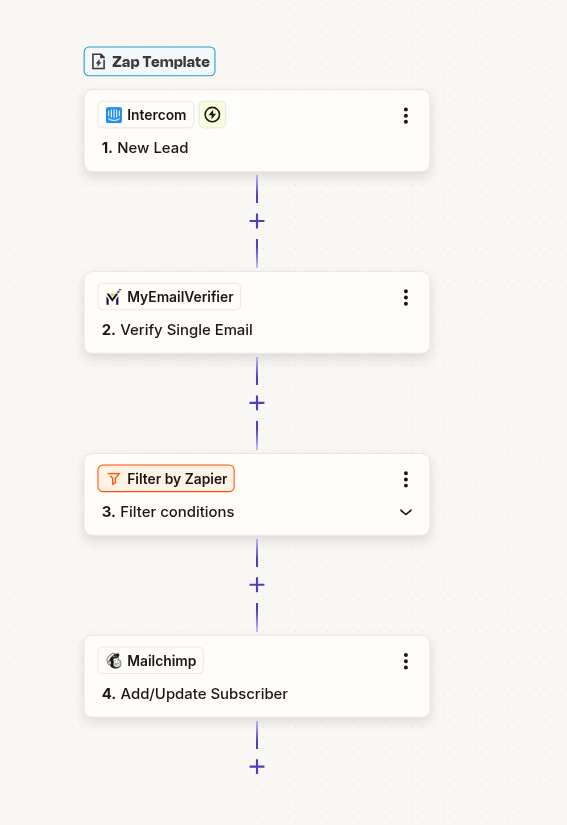
Intercom to Mailchimp email verification workflow with Zapier automation
Intercom New Lead/User

Live chat conversation started

MyEmailVerifier

Verify email address quality

Add to Mailchimp

Subscribe verified email
Why Use This Integration?

Convert Chat to Email

Turn Intercom conversations into email subscribers. Capture leads from live chat and nurture them through email marketing campaigns.

Protect Email Lists

Only add verified emails to Mailchimp. Prevent fake addresses from polluting your lists and harming sender reputation.

Instant Follow-Up

Automatically enroll verified leads in email sequences. Continue the conversation after chat ends with targeted drip campaigns.

Step-by-Step Setup Guide

1Connect Intercom as Trigger

Set up Intercom to detect new leads or users:

  • Log in to Zapier and create new Zap
  • Search for "Intercom" and select it
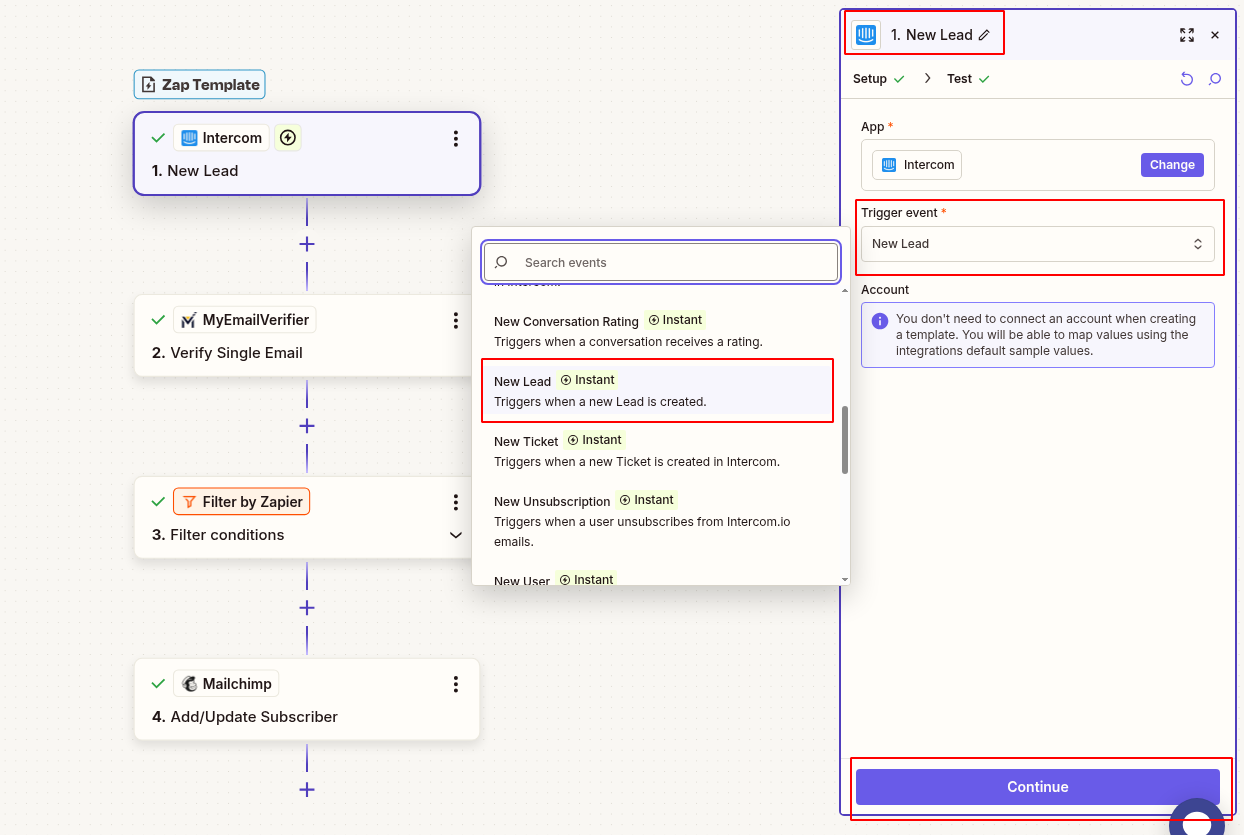
  • Choose trigger: "New User" or "New Lead"
  • Connect your Intercom workspace
  • Configure filters if needed (e.g., only leads with email addresses)
  • Test to pull sample lead data
Connect Intercom new lead trigger in Zapier

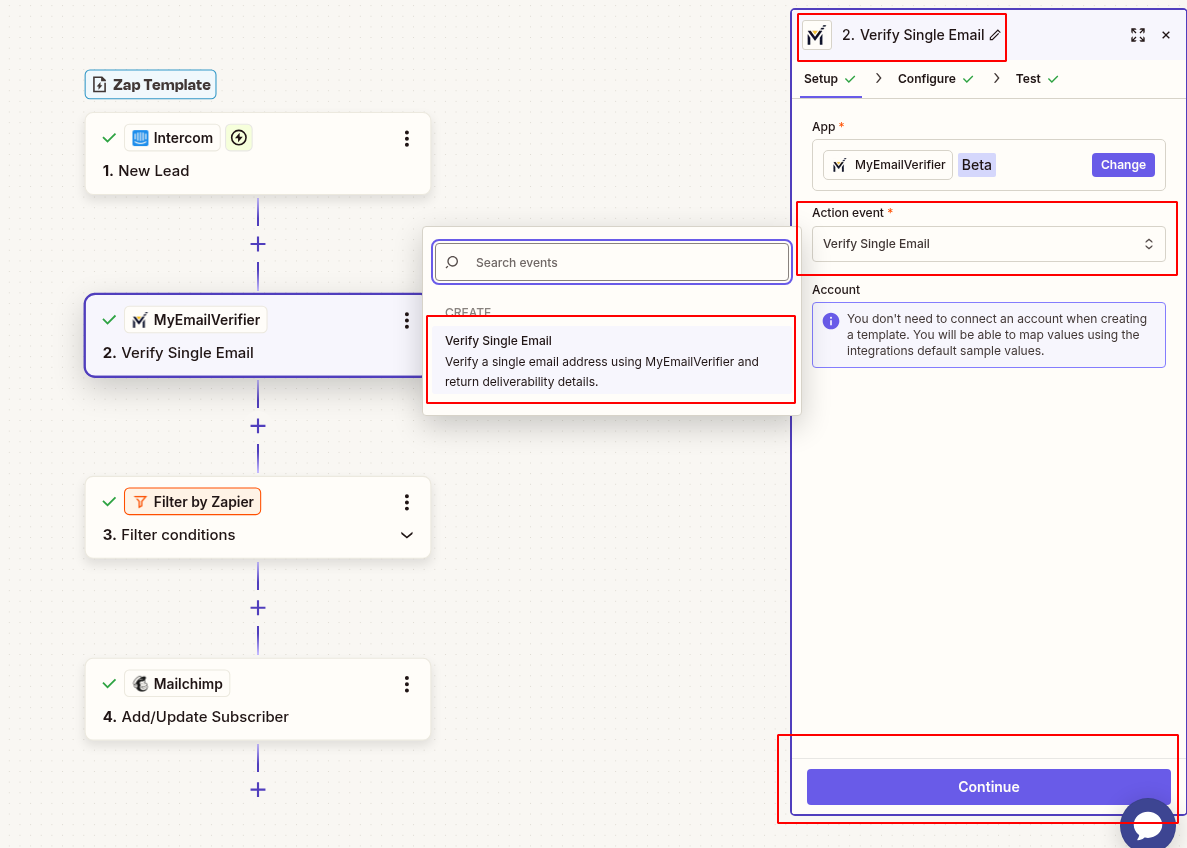
2Add MyEmailVerifier Action

Verify the email address:

  • Click "+" to add action
  • Search for "MyEmailVerifier"
  • Choose: "Verify Email"
  • Connect your MyEmailVerifier account
  • Map Intercom email field to verification input
  • Test to see verification results
MyEmailVerifier verify Intercom email in Zapier

3Add Path Filter (Only Valid Emails)

Only add verified emails to Mailchimp:

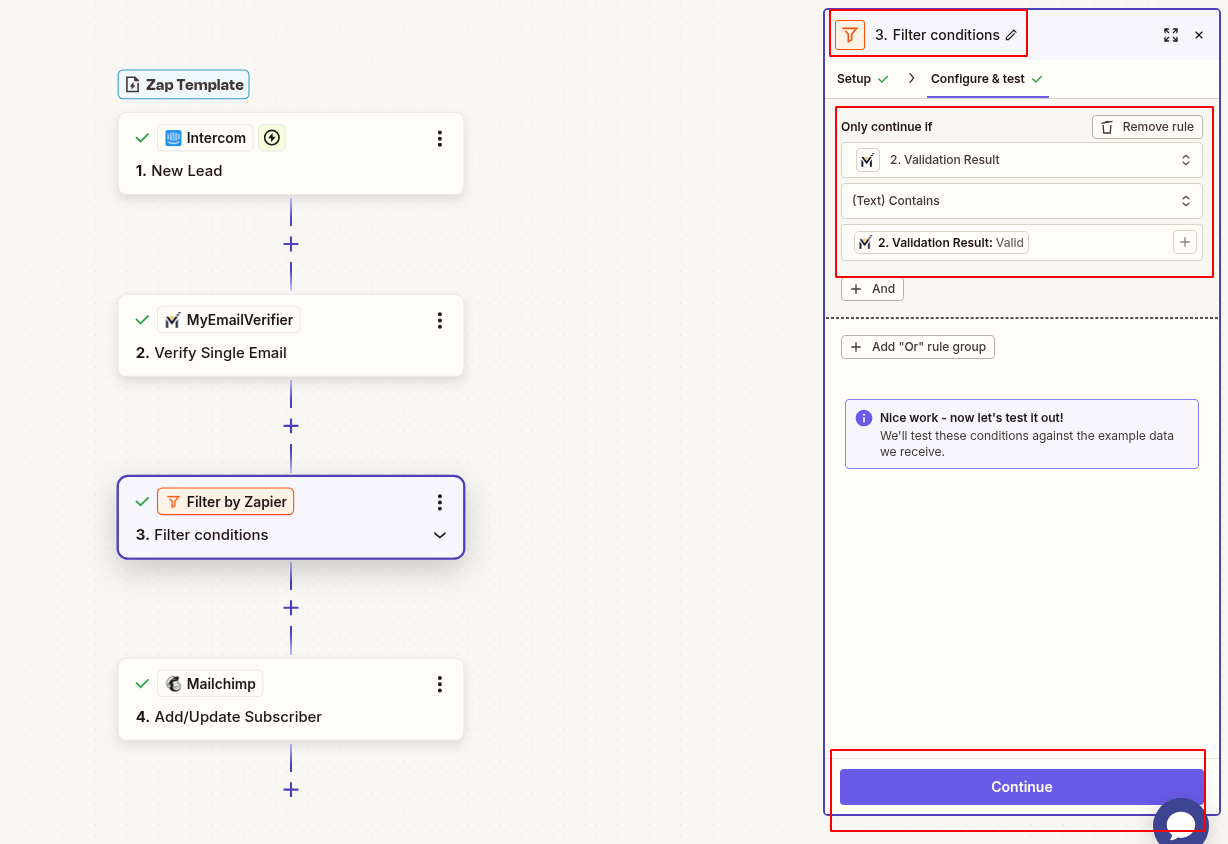
  • Add "Filter by Zapier" step
  • Set condition: Verification Status equals "valid"
  • This prevents invalid/risky emails from reaching your list
Zapier filter valid emails only for Intercom

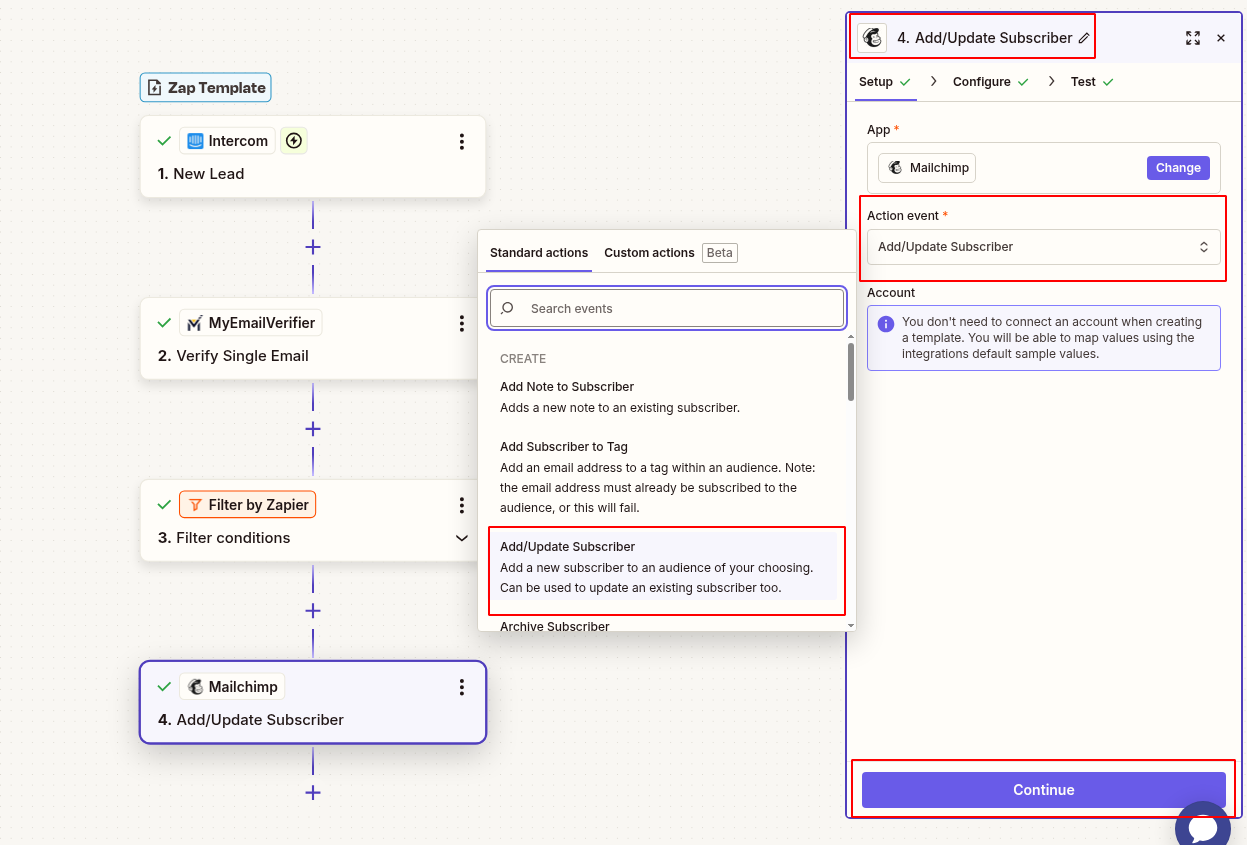
4Add to Mailchimp

Subscribe verified email to your list:
  • Add Mailchimp action: "Add/Update Subscriber"
  • Connect your Mailchimp account
  • Select target Audience/List
  • Map fields:
    • Email: Email from Intercom
    • First Name: Lead first name
    • Last Name: Lead last name
    • Tags: "Intercom Lead", "Verified"
    • Merge Fields: Company, lead score, source
  • Set status: Subscribed or Pending (based on your compliance needs)
Mailchimp add verified subscriber from Intercom

5Test & Activate

Verify everything works:

  • Test complete workflow with sample data
  • Verify fields map correctly
  • Check verified emails appear in Mailchimp
  • Turn on Zap when testing successful

6Optional: Update Intercom with Verification Status

Tag Intercom contacts with email quality:

  • Add Intercom action: "Add Tag to User"
  • Add tags based on verification status: "Email Verified", "Added to Mailchimp"
  • This helps your support team know which leads are in email nurture

7Test & Activate

Verify complete workflow:

  • Start test conversation in Intercom with valid email
  • Verify email appears in Mailchimp with correct tags
  • Check Intercom for updated tags
  • Turn on Zap when testing successful

Real-World Use Cases

SaaS Product Demo Follow-Up

Scenario: Visitors chat with support asking about product features. They provide email for demo access.

Workflow: Verify email, add to "Demo Requests" Mailchimp list. Trigger automated demo video + trial email sequence.

Benefit: Seamless transition from chat to email nurture. Higher demo-to-trial conversion rate.

E-commerce Abandoned Cart Recovery

Scenario: Customer chats about product availability or shipping but doesn't complete purchase.

Workflow: Capture email from chat, verify, add to "Interested Buyers" segment. Send product recommendations and discount codes.

Benefit: Recover potentially lost sales through targeted email follow-up campaigns.

Support to Marketing Bridge

Scenario: Support team helps non-customers via live chat. These are warm leads showing interest.

Workflow: Tag conversations with "Prospect", verify email, add to general newsletter list with "Support Interaction" tag.

Benefit: Turn support interactions into marketing opportunities. Build relationship beyond support.

Webinar Registration from Chat

Scenario: Visitors ask about upcoming events or training in live chat.

Workflow: Collect email via Intercom, verify, add to "Webinar Invites" list, trigger registration email with calendar link.

Benefit: Streamline event registration, reduce no-shows with verified attendee emails.

What You'll Need

Intercom Account

Active workspace with API access

Zapier Account

Paid plan for multi-step Zaps

MyEmailVerifier API

Active account with credits

Mailchimp Account

Active audience/list for subscribers

Troubleshooting Tips

Missing Email Addresses

Issue: Some Intercom leads don't have emails

Solution: Use filter to check email exists before proceeding. Configure Intercom to require email collection.

Mailchimp Duplicate Errors

Issue: Error when email already subscribed

Solution: Use "Add/Update Subscriber" action instead of "Add Subscriber". This updates existing contacts gracefully.

GDPR Compliance Concerns

Issue: Need consent before email marketing

Solution: Set Mailchimp status to "Pending" and send double opt-in email. Or add filter for Intercom tag "Marketing Consent".

Too Many API Calls

Issue: High volume of chat leads hits rate limits

Solution: Add delay/throttle between steps. Or filter only high-quality leads (e.g., lead score > 50).

Ready to Convert Chat Leads to Email Subscribers?

Bridge Intercom conversations to Mailchimp campaigns with verified email addresses.

Create This Zap View All Templates
MyEmailVerifier

Copyright © 2026 · MyEmailVerifier · All Rights Reserved